You’re logging on to check your TikTok notifications, and all of a sudden your numbers have exploded. Over a thousand comments? Hundreds of thousands of views? Several hundred DMs??
It’s happened! Your moment to shine—your first viral video on TikTok.
Except you already had a massively full to-do list for the day, and now you have to add responding to all of these comments and DMs to it.
This is where TikTok DM automation can make a huge impact on your efficiency.
TikTok is extraordinary at surfacing your content to people who are ready to engage. I mean, more than 9 in 10 users take some kind of action (whether it’s a like, comment, follow, DM, or purchase) after watching a video. That’s…pretty impressive.
However, you need a system in place to help you respond to those actions. And setting up DM automation on TikTok can be the answer.
This guide is a complete walkthrough of how to use TikTok DM automation. You’ll learn more about what it is, why it matters, how to build your first flow in Vista Social step by step, and more.
So let’s get started.
What is TikTok DM automation?
TikTok DM automation uses trigger-and-response logic to send pre-built messages the moment a user reaches out to your account. This helps ensure everyone reaching out to your brand gets a reply within seconds regardless of time zone, team size, or how many other things are running simultaneously.
The most common setup works on keyword matching: When someone DMs your account with a word like “price,” “link,” or “booking,” a pre-written response fires instantly with the relevant information.
More advanced setups layer on data collection to capture lead details inside the conversation, labeling to organize incoming messages by intent, and task assignment to escalate specific threads to the right team member automatically.
A few platform-specific rules are worth understanding before you build anything:
TikTok operates on a 48-hour messaging window, meaning once a user interacts with your account via DM, you have 48 hours to continue that conversation before the window closes. You also have the ability to send up to 10 messages within that 48 hour window.
After that, you cannot send messages unless they reach out again, which makes having your automation live before a post takes off significantly more valuable than on other platforms where you have more recovery time.
TikTok DM automation is only available for TikTok Business Accounts and runs through TikTok’s official Business Messaging API, which is what Vista Social connects through. Every automation runs through compliant infrastructure with no account risk from grey-market workarounds.
There are also regional restrictions worth knowing: The API is unavailable in the European Economic Area, Switzerland, and the UK, so if you’re managing accounts or clients in those regions, that’s worth surfacing before you build a strategy around it.
Vista Social’s TikTok DM automation runs from the same dashboard you already use for Instagram, Facebook, and other platforms, with every TikTok conversation landing in a unified inbox so your team has one view of every lead regardless of where it started.
Why should you use TikTok DM automation?
TikTok has 1.9 billion monthly active users globally, and its users spend more time in-app than they do on Instagram or Facebook. Socialinsider’s benchmark analysis found TikTok’s average engagement rate hit 4.90% in the first half of 2025, the highest of any major social platform.
When a video lands on TikTok, the engagement that follows can be significant to manage manually, and the DM volume from a single well-performing video can exceed what some accounts see in a month on slower platforms.
For the social media manager sitting in that inbox trying to handle it all, that’s a real operational problem.
Here’s what automation solves specifically.
Respond instantly while intent is highest
When someone watches a video and sends a DM, they’re in a window of genuine interest, and every hour without a response is a percentage of that interest cooling off. Automation responds in seconds, catching people at the exact moment they’re most likely to take action rather than the next morning when they’ve moved on.
Handle repeat questions without repeat effort
Pricing, availability, shipping timelines, how to book, how to apply for a collaboration. These are the same questions across thousands of different people, and answering each one manually is one of the most expensive uses of a social media team’s time. Automation handles them consistently and accurately every time, freeing your team up for the conversations that actually require judgment and a human response.
Capture leads directly inside the conversation
Sending someone from a TikTok video to a bio link to a landing page to a form introduces multiple points where people can drop off, and TikTok users are particularly reluctant to leave the app mid-session. An automated DM flow captures an email address, phone number, or any other relevant detail directly inside the conversation, with no redirect and no friction. Every lead gets tagged and saved in Vista Social’s unified inbox.
Signal active engagement to the TikTok algorithm
TikTok’s algorithm weighs back-and-forth engagement positively, so accounts where users send DMs and receive fast, relevant responses signal active community engagement that contributes to broader content distribution. The automation serves the person who messaged and simultaneously signals to the platform that the account is worth pushing to a wider audience.
How to set up TikTok DM automation in Vista Social
Before you open a single setting, decide what job this automation needs to do, because a lead capture flow looks different from a product inquiry flow, which looks different from a customer service flow.
Pick one primary goal, build for that, run it for two weeks, and then layer the next flow on top once you can see how the first one performs.
Step 1: Connect your TikTok Business Account
Vista Social requires a TikTok Business Account linked through the official API. If the account is still set to personal, go into TikTok’s app settings and switch it to Business before connecting.
To add your business account to Vista Social (if you haven’t done so already), log into your dashboard, click Quick add in the left hand sidebar, then click Add a social profile. Select it from the available options and configure the connection.
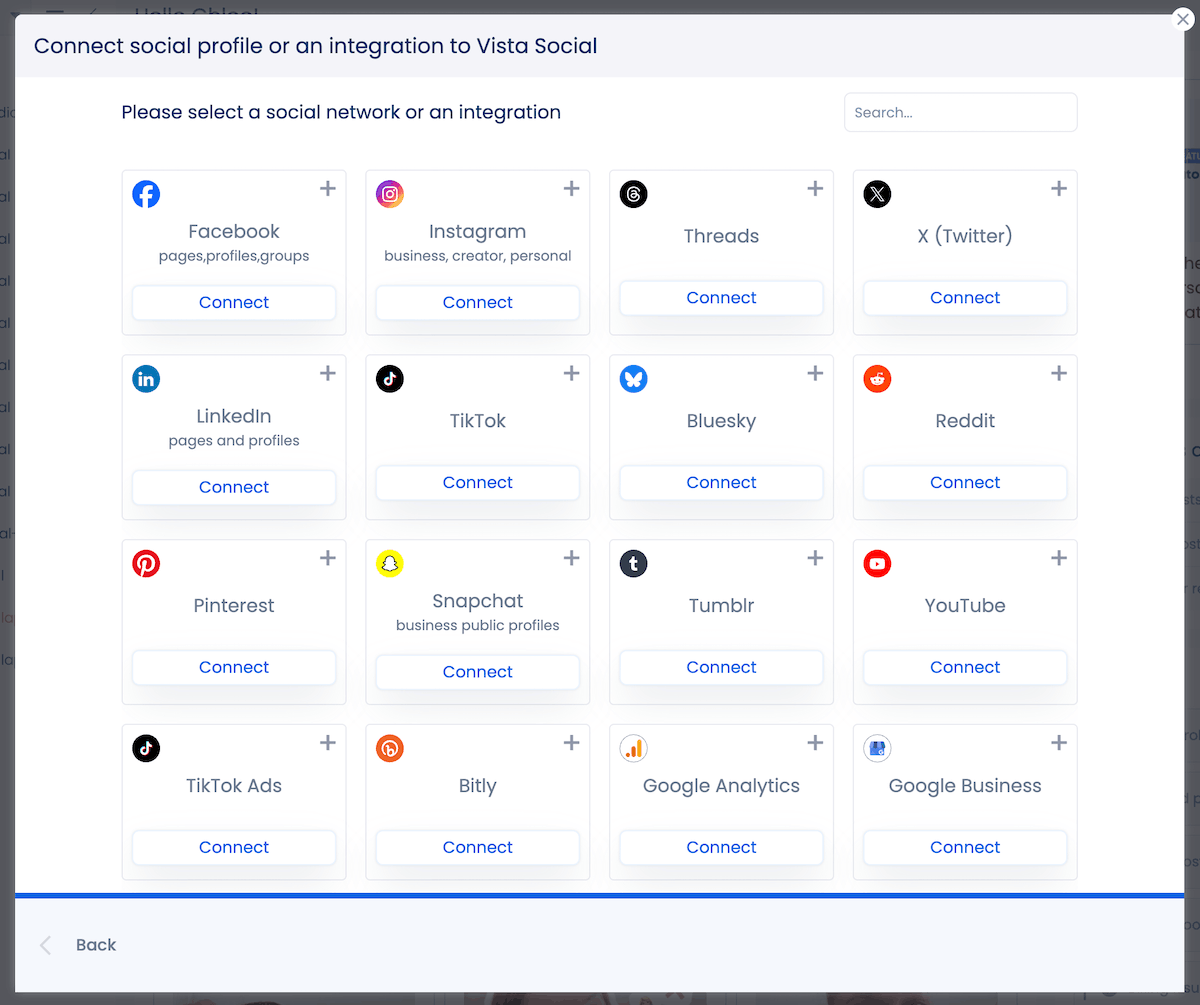
Once added, the TikTok profile appears in your Vista Social dashboard alongside your other connected profiles.
Step 2: Create a new automation
In the left sidebar, navigate to Automations and click Create automation. A popup will appear with two options: start with a template or create from scratch.
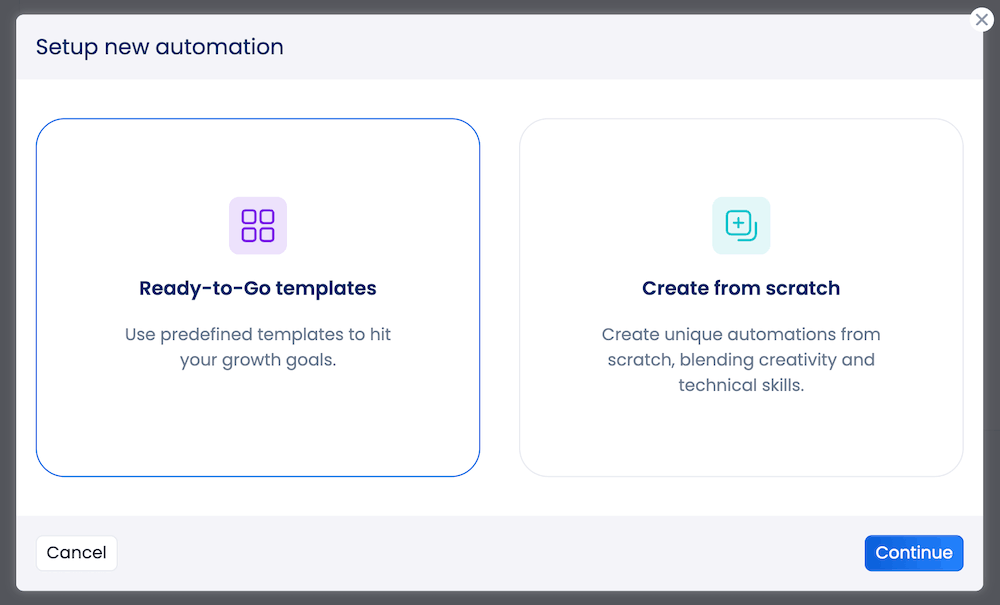
We have several templates that give you an easy jumping off point for your automations, but for the purposes of this tutorial, we’ll be creating from scratch.
Click Continue, then name your automation clearly so it’s easy to identify when you’re managing multiple flows across multiple client accounts. Then select your TikTok Business profile from the profile dropdown.
Step 3: Choose your trigger
Vista Social supports two trigger types for TikTok automation—but it’s important to remember that the end actions will differ for each one.
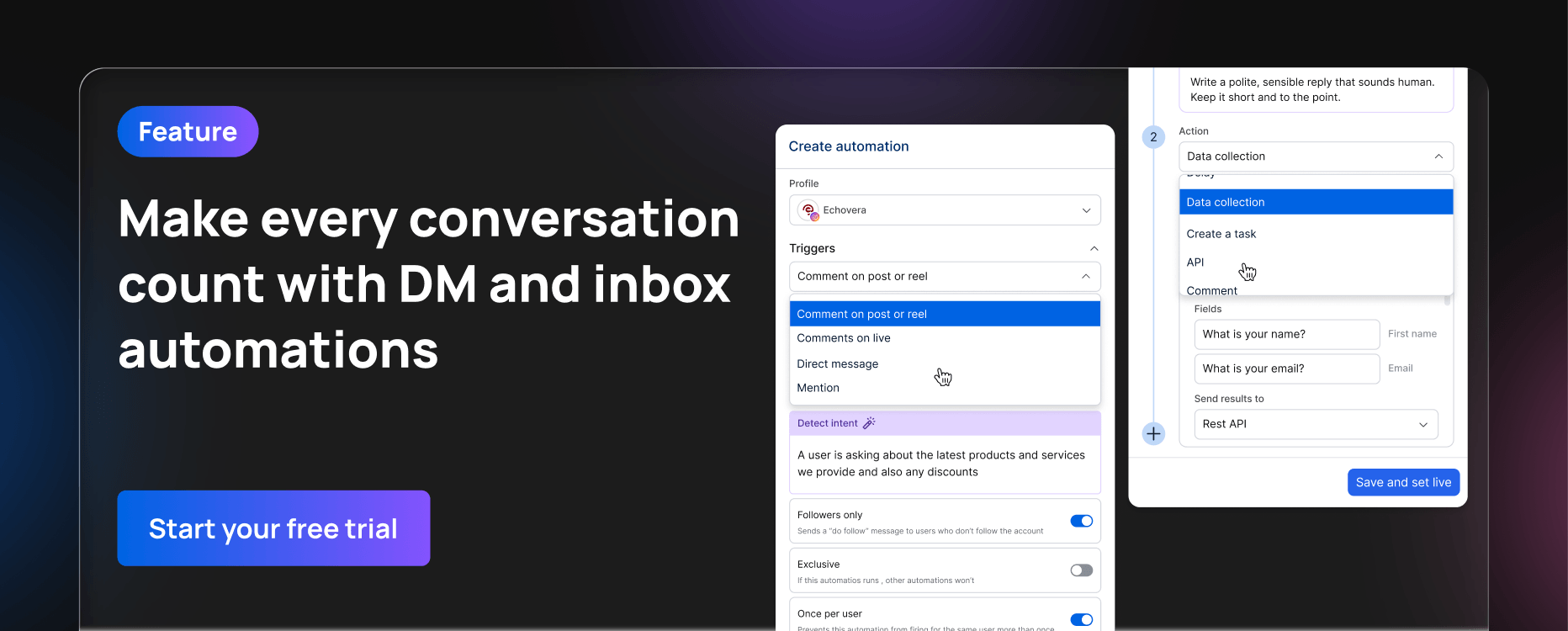
Direct message fires when a user sends a DM to your account. You can set it to trigger on any incoming message, use AI to detect the message intent and respond accordingly, or restrict it to messages containing a specific keyword.
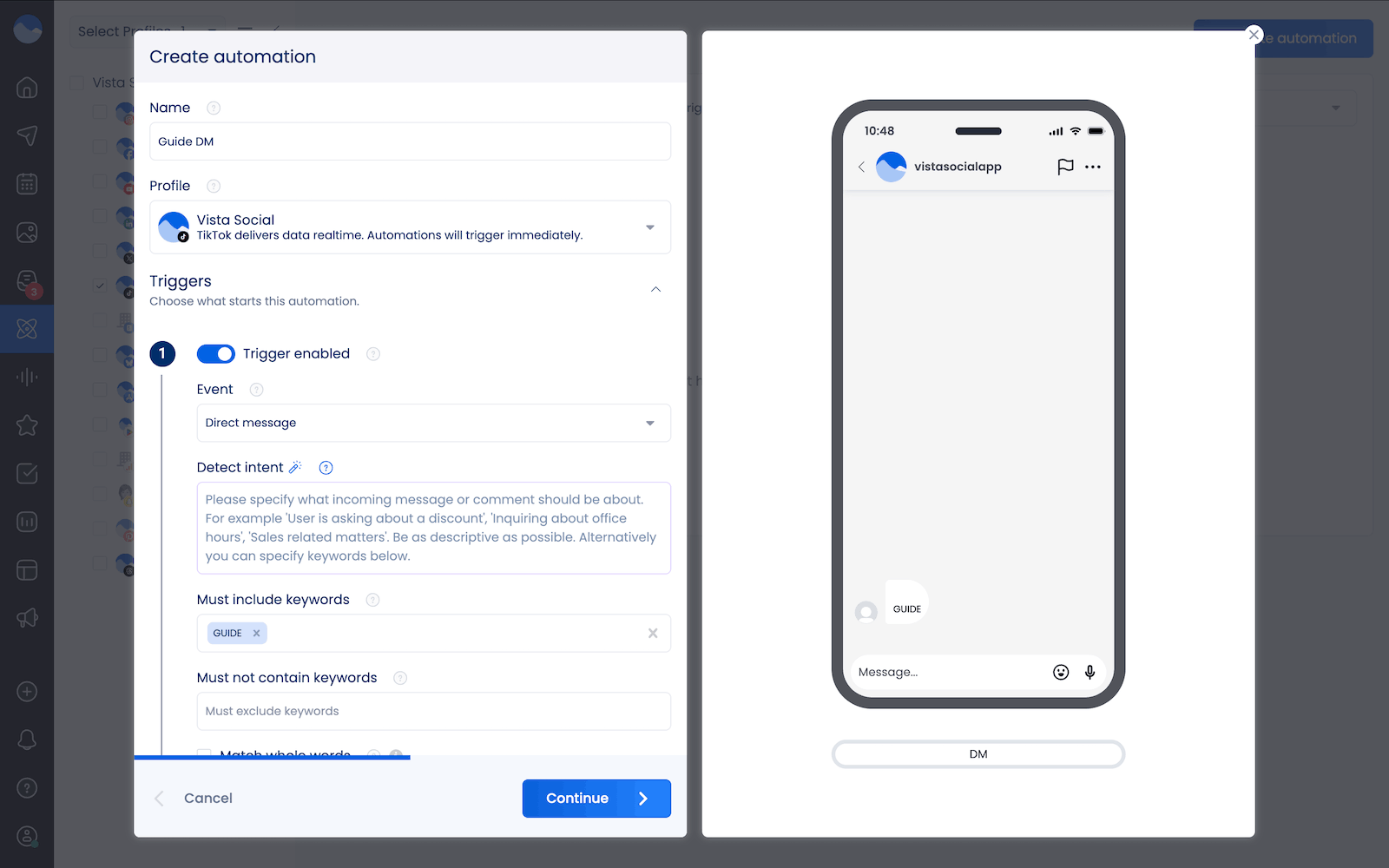
Keyword match gives you the precision you need for campaigns: If your video CTA says “DM us GUIDE and we’ll send you the breakdown,” setting “GUIDE” as your keyword means the flow only fires for people explicitly signaling that intent.
Comments on post or reel fires when a user comments on one of your TikTok videos or carousels. However, because TikTok’s limitations only allow you to DM someone who has already DMed you, you can only respond to a comment with another comment.
You can also toggle Followers only to gate the automation to existing followers, which doubles as a passive growth mechanic since non-followers receive a prompt to follow before accessing the offer.
Then scroll down to access your automation settings. Here, you’ll find options like:
- Schedule, which restricts the automation to specific dates or time windows. This is useful for campaign-specific flows tied to a launch or limited-time offer so the automation doesn’t keep running after the campaign ends.
- Sequence, which lets you specify which order your different automations should fire in (if you have multiple).
- Exclusive, which prevents a user from being enrolled in multiple automations simultaneously, keeping conversations clean when you have more than one active flow running at the same time.
- Once per user, which prevents the same person from entering the same flow multiple times. This matters when you have evergreen automations running across all posts.
Once you’ve finished setting up your triggers and settings, click Continue to move onto the next step.
Step 4: Build your response chain
This is where you’ll put together your automated response. You’ve got several options. For a DM automation, you can use AI to draft a response based on the prompt you provide (and even using AI knowledge).
But for the example we’re using, we’re going to write out a text response that includes the link to our guide.
Under Actions, select Direct message and write out your reply, leading with what the user came for rather than brand context. If they asked for a link, the link is the first thing they see. If they asked for pricing, pricing leads.
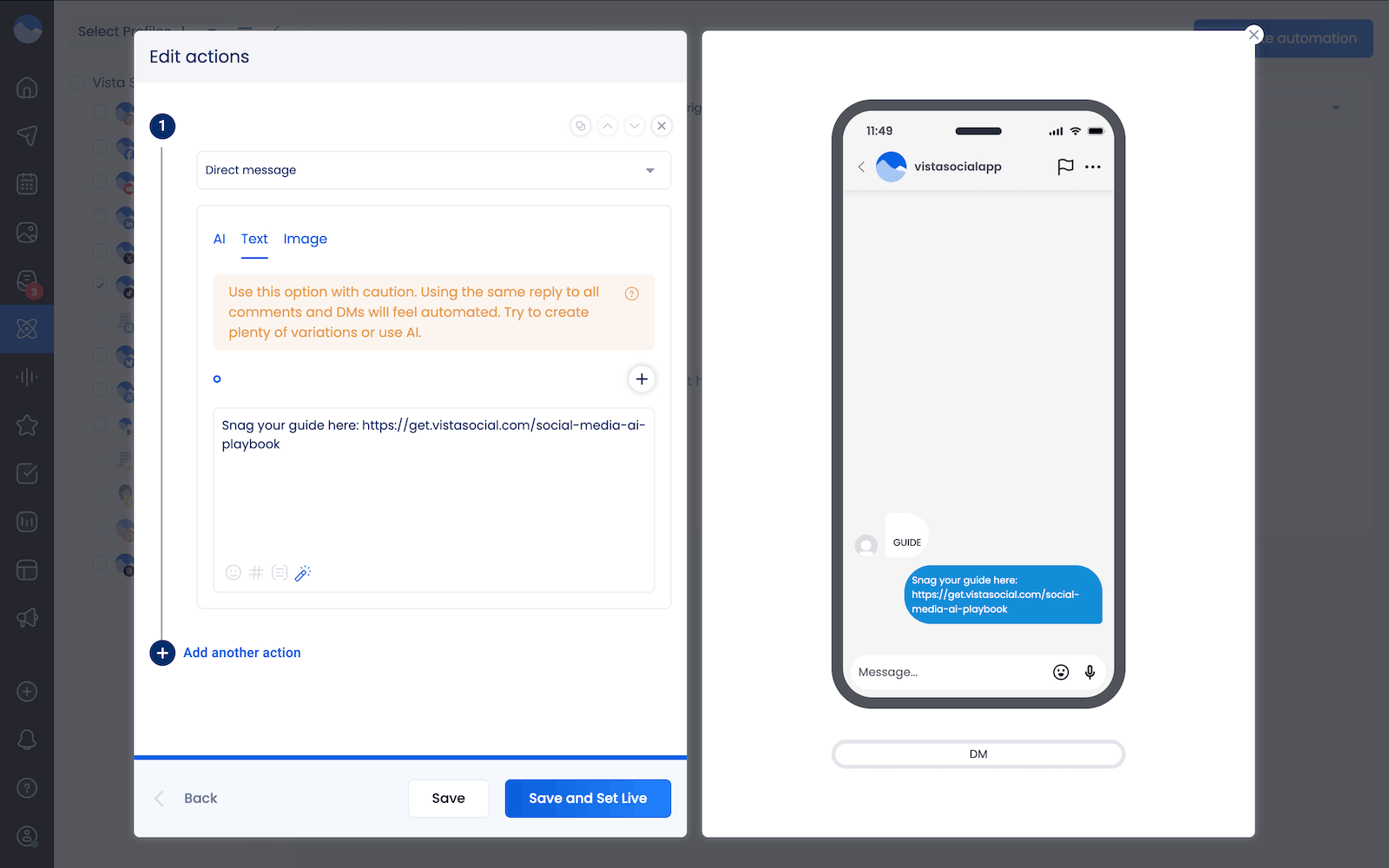
If you want to email-gate this guide, you can choose Data collection as your first action and ask for information like name and email address before sending over the guide.
You can also chain multiple actions simultaneously.
For example, you can send a DM > Apply label to tag the conversation with something like “product inquiry” or “warm lead” for inbox organization > Assign task to route it automatically to the team member who handles that conversation type.
Step 5: Test right after activating
Click Save and Set Live to activate your automation. But before you fully finish up with this process, you’ll want to test it out yourself to make sure it works properly.
Use a secondary account (like your personal account if you have one) to send the trigger keyword to your TikTok Business Account and verify the response arrives correctly, the label applies, and any data collection is working as expected.
TikTok DM automation use cases
TikTok DM automation can be a major part of your strategy, but let’s talk actual examples of how you might want to put this into practice.
Here are eight ways social media managers at brands and agencies use TikTok DM automation, each one built around the platform’s specific content behavior and audience dynamics.
Use case 1: Viral video lead capture
A video takes off at 11pm on a Thursday, and by 2am the inbox has 80 messages from people asking how to order. Without automation, most of those conversations are cold before the team sees them.
With a keyword-triggered flow built directly into the video, every one of those messages gets an instant, accurate reply the moment it arrives. You build the keyword into the content itself, spoken aloud or overlaid as on-screen text, so the flow runs continuously while you sleep.
With AI intent, you can set up automations that will answer common FAQs your customers tend to have before they order so those automated responses go out instantly and you don’t have to worry about losing time.
Given TikTok’s 48-hour messaging window, this is where having automation live before a video takes off matters most.
Use case 2: TikTok Shop product inquiry handling
$15.82 billion in US sales in 2025, and the DMs that come in from product content tend to be some of the highest-intent conversations your inbox will see.
When someone DMs asking about sizing, availability, or shipping after watching a product video, create an automation flow (or a few) that:
- Answers FAQs instantly
- Delivers the direct Shop product link
- Applies a TikTok Shop label
With a specific shopping related label, your team can filter inbox messages to see how much of your DM volume is directly tied to Shop-driven revenue.
Use case 3: Service business appointment booking
TikTok’s algorithm regularly surfaces content to people who have never seen your account before, making it one of the stronger platforms for service businesses to reach genuinely cold audiences. A fitness trainer, real estate agent, aesthetics clinic, or any service-based brand posting regularly will see DMs from people who watched a single video and want to book.
With an automation flow, you can capture their name, preferred window, and contact details inside the conversation and then assign the thread to the relevant team member for confirmation, keeping the entire intake process within the app without anyone navigating to an external form.
Use case 4: TikTok Live follow-up automation
TikTok Lives generate a specific kind of post-stream DM spike where viewers watch a product demo or Q&A, get interested in something mentioned, and message immediately after the broadcast ends. That traffic arrives in a compressed window and dissipates quickly, so a manually monitored inbox will miss most of it.
An automation configured to run during and immediately after a scheduled Live delivers the offer or link mentioned on stream to everyone who messages while the team is fully focused on the broadcast itself. Set it to activate at the stream’s start time and deactivate when the offer window closes, and every relevant DM gets a response within seconds regardless of volume.
Use case 5: Creator collaboration and partnership inquiry triage
Brand and media profiles with significant followings receive a steady stream of creator collaboration requests, sponsorship pitches, and partnership inquiries via DM, and most of these belong in a completely different priority queue from customer conversations.
An automation built around keywords like “collab,” “partnership,” or “media kit” sends an instant holding response with a link to your submission form, applies a “collab inquiry” label, and moves the conversation out of the main queue without anyone touching it manually. The right inquiries still reach the right people, and the inbox stays organized.
Use case 6: Campaign-specific discount code delivery
Time-limited offers and product launch campaigns on TikTok can drive a high volume of DMs inside a narrow window, and a campaign-specific automation flow delivers the code instantly to everyone who asks, tracks exactly how many were sent, and deactivates automatically on the scheduled end date.
Each campaign gets its own keyword, its own flow, and its own inbox label, which keeps reporting clean and makes it easy to see precisely how much DM volume each campaign generated without manually counting a single conversation.
TikTok DM automation best practices
Getting the flow built is the easier part. Running it well over time comes down to a handful of decisions that most teams only think about after something has already gone wrong.
Train your AI before going live
Vista Social’s AI Training and Knowledge Base under Settings > AI Training powers your automated responses when you use Dynamic AI Reply, and the quality of those responses depends entirely on what you put into it.
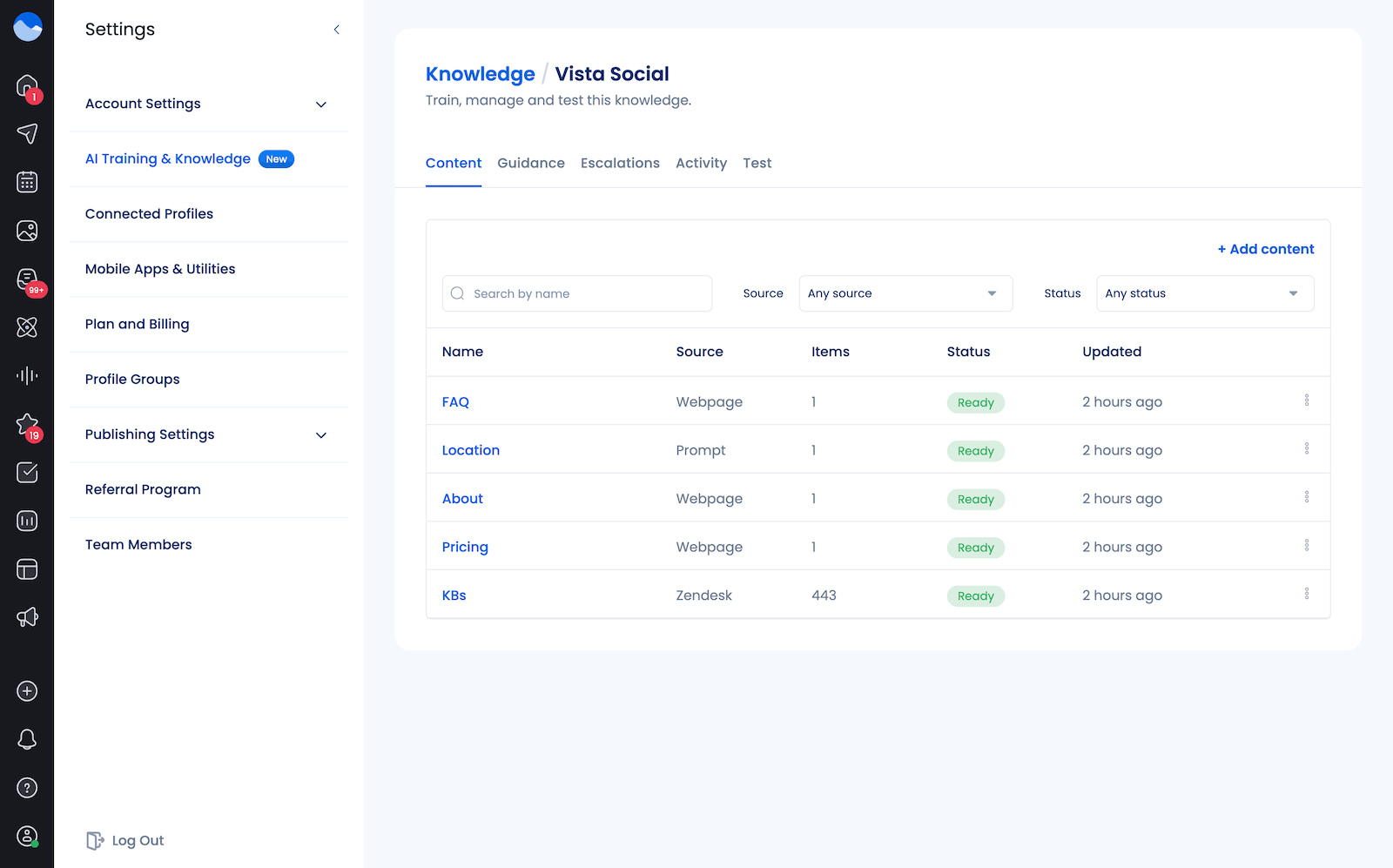
Before activating any flow, upload your FAQs, product details, pricing, shipping policies, and tone guidelines so the AI has accurate, brand-specific information to draw from. Check the Activity tab regularly to see which questions your TikTok audience is asking that no existing automation matches, because those gaps are your next flows and your most useful content intelligence at the same time.
Build the CTA into the video itself
The most effective TikTok automation setups make the keyword part of the content experience rather than something buried in the caption, because many TikTok users watch without reading captions at all. Say the keyword aloud during the video, overlay it as on-screen text at the relevant moment, and put it in the first line of the caption so it’s visible before the “see more” cutoff.
Specificity matters more than most teams expect: “DM us for more info” generates far fewer responses than “DM us the word PRICING, and we’ll send you the full breakdown,” because the specific instruction removes any ambiguity about what to do and what the person will receive.
Keep your first message short and immediate
TikTok’s audience moves quickly, and a DM that opens with brand messaging before getting to the answer will lose people before they convert. Lead with what the user asked for, add one clear CTA or qualifying question, and let the conversation build from there. If they reply, the window is open, and you can go deeper from a position of established trust.
Always include a human exit
Complex objections, high-value buyers ready to talk specifics, and frustrated customers all need a person rather than a pre-built flow.
Vista Social’s Assign task action handles that escalation automatically by routing conversations to a specific team member based on intent or keyword without the user needing to ask for it. You can also add Escalation rules to your AI Knowledge that let the automation AI know when a conversation needs to be routed to a human.
Rotate your message variations
Vista Social lets you write multiple versions of the same message and rotate through them automatically. Sending identical text to every person who triggers a keyword is how accounts start to look like spam operations to platform detection systems. Three to five variations (at a minimum) keeps things meaningfully different while maintaining a consistent message and protects the account’s standing over time.
Using AI to respond is another way to keep your brand from sending the same DM or comment response over and over again.
Audit your flows when campaigns or products change
TikTok moves quickly, campaign automations need end dates, and product-specific flows need updating when pricing or availability changes. A monthly review of every active automation to verify that every message, link, and offer is still accurate takes fifteen minutes and prevents the kind of automated wrong answer that damages brand trust in ways that take far longer to repair.
Remember that you can’t DM from a comment
TikTok’s limitations don’t let you send a DM from a comment the way you can with Instagram DM automation. Create a workaround for this in case someone leaves a comment with your keyword instead of sending you a DM.
Activate an automation that triggers based on a comment with your keyword (i.e., GUIDE) with a comment response saying some variation of, “Hey, send us a DM with the keyword GUIDE so we can send you the link!”
Get started with TikTok DM automation today
Managing TikTok well is already demanding on the content side alone. You’re producing videos, tracking what performs, adjusting strategy based on what the algorithm is rewarding this week, and doing all of that across multiple profiles if you’re running an agency. The DM inbox on top of that is where the workload quietly doubles, because every video that works generates a wave of messages that the content itself can’t answer.
TikTok’s algorithm does the hard work of getting your content in front of people who are genuinely interested. Every person who watches to the end and reaches out is proof the content did exactly what it was supposed to do. What happens next depends on the infrastructure behind it, and the accounts seeing consistent, measurable results from TikTok have treated the inbox as a system rather than a task list, building automations that handle the repeatable work so the team can focus on the conversations that actually require a person.
Set up your first TikTok DM automation in Vista Social here and build that infrastructure for your accounts today.
TikTok DM automation FAQs
Is there a DM function on TikTok?
Yes. TikTok Business Accounts can send and receive direct messages through the platform’s inbox, and users can initiate conversations with business accounts directly. TikTok’s Business Suite provides native basic automation features, including a welcome message, keyword replies, suggested questions, and chat prompts. For multi-step flows, data collection, unified inbox management across platforms, and full automation at scale, Vista Social connects through TikTok’s official Business Messaging API. See our guide to TikTok for business for a broader overview of what the platform supports commercially.
Can you automate DMs on TikTok?
Yes, through TikTok’s official business messaging API, available for TikTok Business Accounts in supported regions outside the EEA, Switzerland, and the UK. Through Vista Social, you can build keyword-triggered DM flows, automatic responses to incoming messages, data collection, conversation labeling, and task assignment, all from the same dashboard you use for your other platform automations. Our full DM automation guide covers how the system works across platforms.
What are some ways to use TikTok DM automation?
Viral video lead capture, TikTok Shop product inquiry handling, service business appointment booking, TikTok Live follow-up flows, multi-client agency inbox management, creator collaboration triage, content-gated lead magnet delivery, and campaign-specific discount code distribution are the eight use cases covered in detail above. For additional ideas across industries and account types, see our DM automation use cases guide.