Most social media managers have the hard part figured out. The content calendar is full, the Reels are landing, and the follower count is climbing.
But there’s a gap between a brand’s social presence and its social revenue. And the DM inbox can actually play a major role in bridging that gap.
Here’s what actually happens when content performs well: People comment, they slide into DMs, and they reply to Stories. They’re reaching out…but is your brand responding?
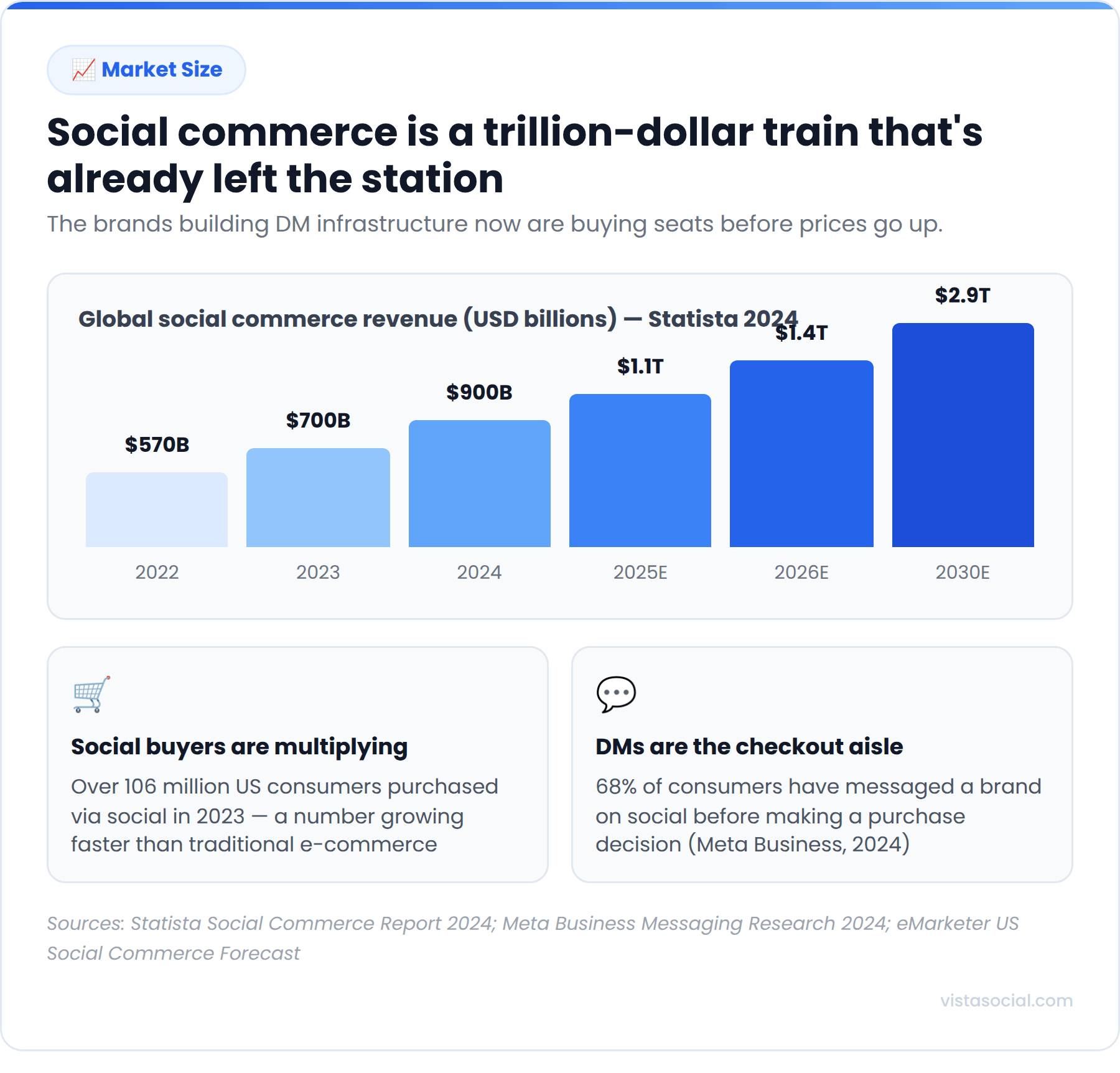
According to HubSpot’s 2025 Social Media Marketing Report, 78% of marketers already expect social DMs to become consumers’ preferred customer service channel. The inbox is already where buying decisions are being made, but most brands just aren’t showing up there consistently enough to close them.
DM automation helps to close that gap, especially on platforms where external links aren’t supported. It makes the transition from post to purchase much more streamlined, which = more sales and more revenue for your brand.
Throughout this guide, we’ll walk you through how you can start generating sales with DM automation so you can turn social media into an actual revenue channel for your business.
How DM automation works
DM automation uses trigger-and-response logic to send pre-built messages the moment someone takes a specific action. You set the rules, a tool like Vista Social executes them, and every relevant user gets a reply in seconds regardless of what time it is or whether anyone on your team is online.
A few core components make it work.
Triggers
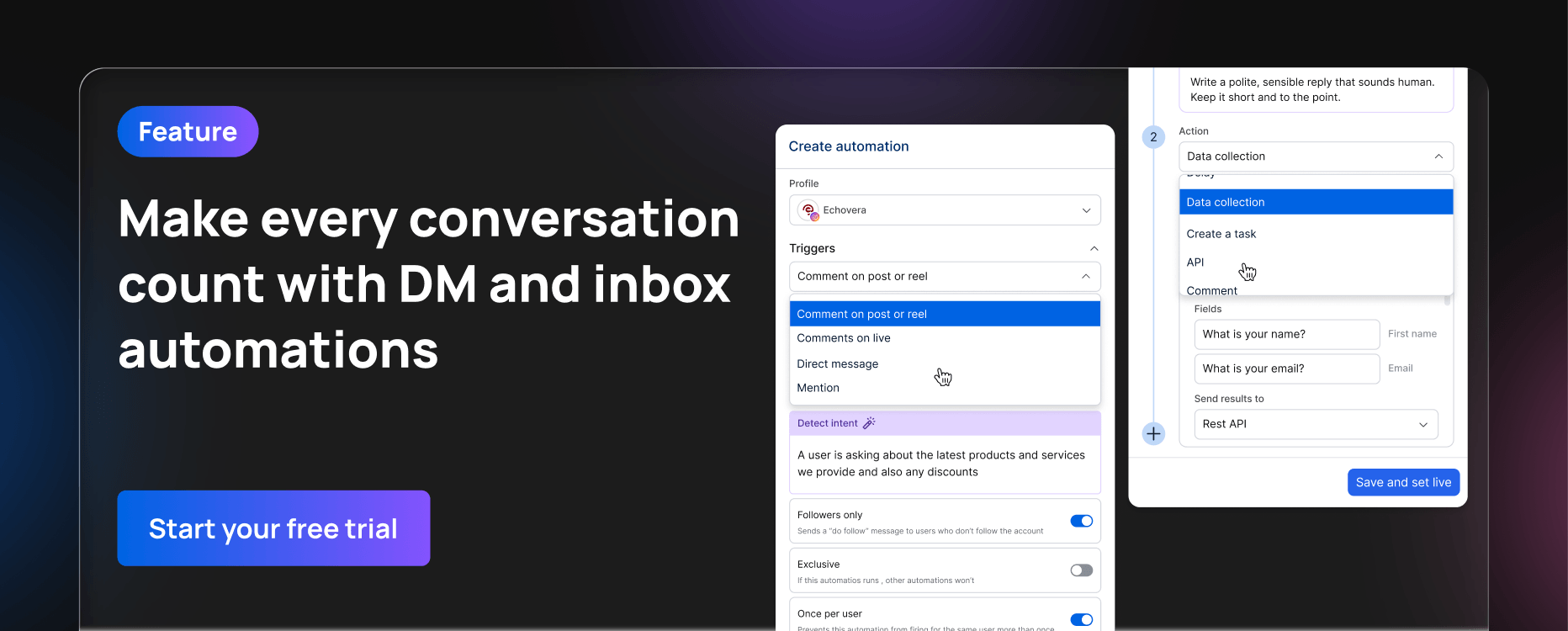
These are the actions that start a flow. A user comments a keyword on your Reel, replies to your Story, sends a first DM, or clicks a “Send Message” button in an ad. The trigger is what kicks everything off, and matching the right trigger to the right intent is what separates a flow that converts from one that gets ignored.
Flows
These are the sequences of messages that follow the trigger. Simple flows send one reply with a link. More sophisticated ones branch based on how the user responds, routing buyers toward a purchase and browsers toward more information.
Auto-replies
These are the individual messages within a flow. Depending on what platform you’re on, they can include text, images, buttons, and product links. Writing multiple variations of each reply and rotating them is what keeps your automation from sounding like a bot.
Intent detection
This is where things get more capable. Instead of matching exact keywords, AI-powered tools read the meaning behind a message and fire the right flow accordingly. Someone writing “how much is this?” and someone writing “what’s the price?” both get the same response, without you pre-building a rule for every possible phrasing.
Vista Social’s DM automation runs natively across Instagram, Facebook, TikTok, and more. All resulting conversations land in a unified inbox alongside your organic messages, and you can chain multiple actions off a single trigger: send a DM, apply a label, assign a task to a team member, and send an email alert, all from one event.
How to make sales with DM automation
Building a DM sales system that works takes more than turning on a few auto-replies. It needs a clear goal, the right setup, and flows that reflect how your audience communicates.
Here’s how to build it properly.
Step 1: Define your social media sales goals
Before touching a single automation, get specific about what you want it to do.
Are you trying to:
- Convert warm leads from a product launch?
- Capture email addresses from your followers?
- Book discovery calls from people who’ve shown interest?
- Automate common FAQs so you can focus on generating revenue?
Each of those goals produces a different flow, and trying to do everything in one automation is the fastest way to do none of it well. Pick one primary outcome per automation and build toward it. Once that flow is running and you can see how it performs, you stack the next one on top.
For social media managers at brands, that might mean a product launch flow tied to a specific campaign. For agencies, it might mean a lead capture flow that feeds a client’s CRM automatically. Either way, the goal comes first, because it shapes every decision that follows.
Step 2: Choose the right platform(s)
Not every platform supports DM automation the same way, and where you build your flows depends on where your audience lives—and where they prefer to shop. Instagram and Facebook have the most mature tooling and support for multi-step flows. TikTok is more limited but growing.
Start with wherever your highest-engagement audience already is, then expand from there.
| Platform | Vista Social DM automation support | Best fit |
| Full support via official API | Product-led brands, ecommerce, visual storytelling | |
| Full Messenger API support | Service businesses, local brands, B2B | |
| TikTok | DM automations and comment automations, but no comment-to-DM automations | Top-of-funnel capture, viral campaigns |
| X/Twitter | DM, comment, and comment-to-DM automations | Tech, sports, and media publications |
| DM automations unavailable, only comment automations | Manual outreach or comment auto-responses only |
The practical advantage of managing this through Vista Social is that all of your social media automations are all connected under one dashboard, so you’re not logging into separate tools to manage flows on different channels. Every conversation, regardless of where it starts, ends up in the same unified inbox.
Step 3: Pick a DM automation tool
Your tool determines how sophisticated your flows can get, how safe your account stays, and how much manual work you’re left doing.
The non-negotiables: native API integration (not browser-based workarounds that risk account restrictions), support for intent detection, and a setup that fits inside your existing workflow rather than adding another platform to juggle.
Vista Social’s DM automation is built into the same platform you already use for scheduling, analytics, and inbox management. Three capabilities separate it from a basic auto-reply tool.
AI Knowledge
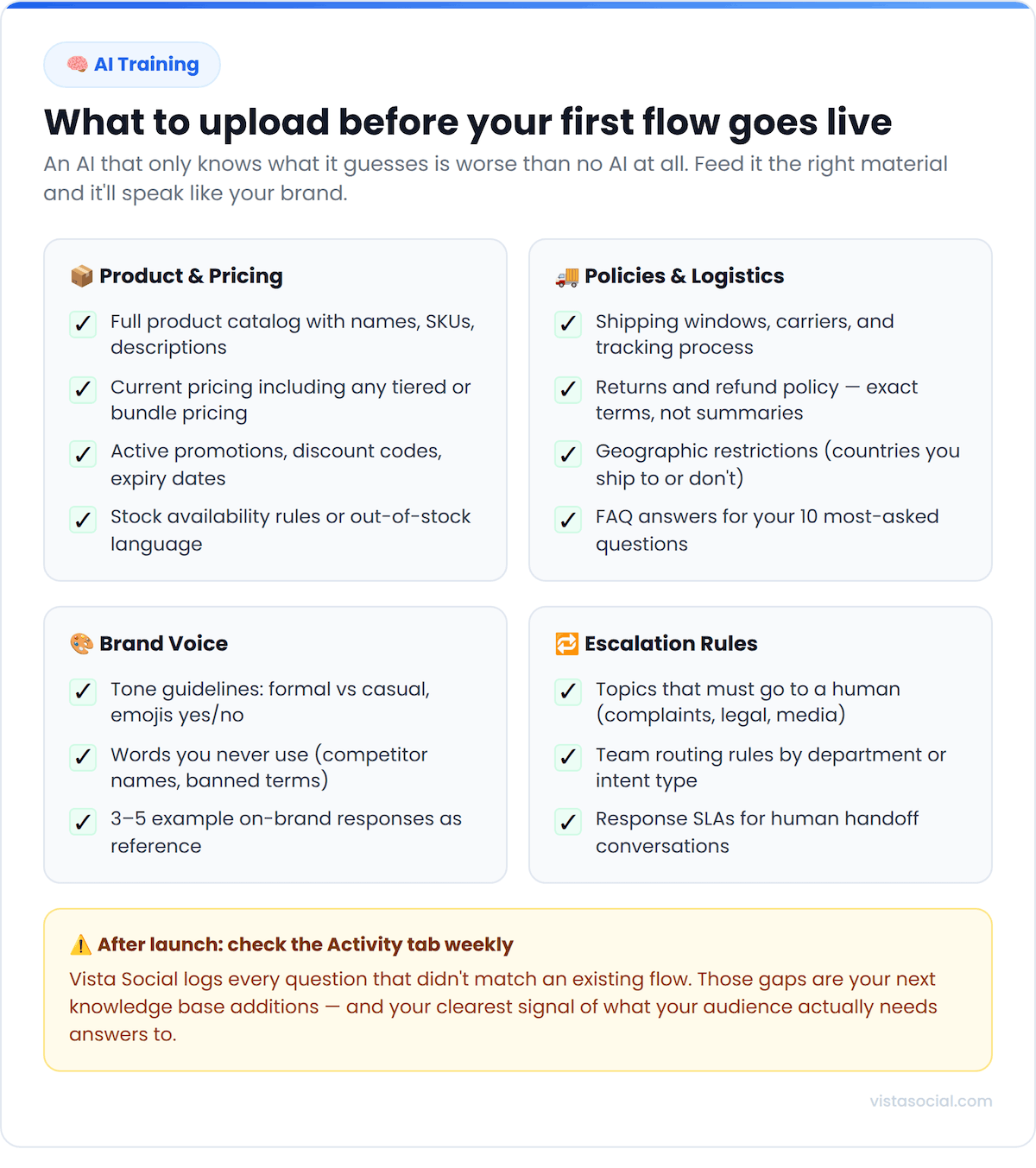
Vista Social makes it possible to use AI as part of your auto-response, and the best way to make sure your AI assistant knows what it’s talking about is through proper training
Go to Settings > AI Training & Knowledge to upload key information the AI needs to know to provide accurate answers to your customers.
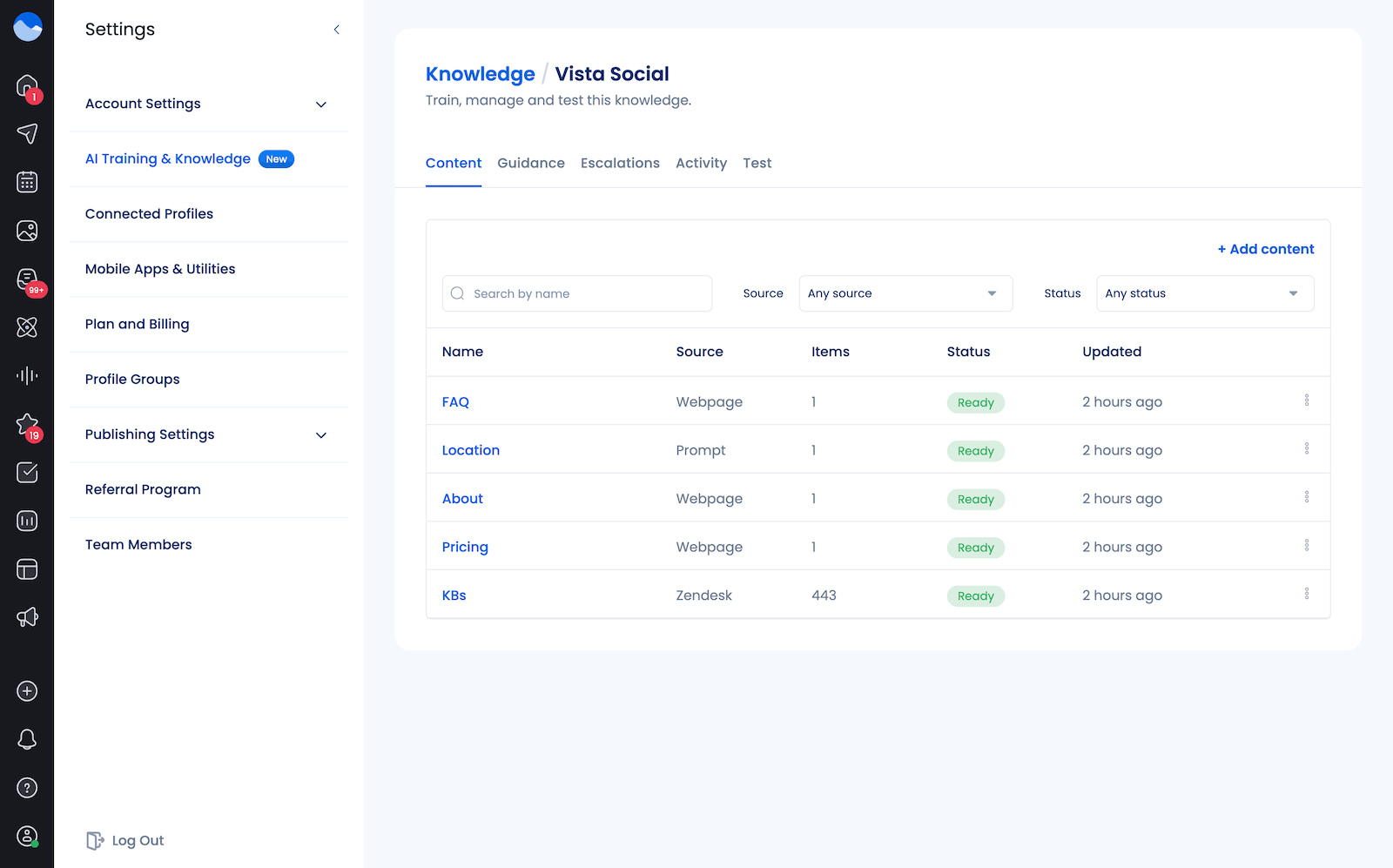
The AI draws from this documentation when generating responses, so automated replies reference your actual products and brand voice rather than generic filler. The Activity tab shows every question your audience has asked that didn’t match anything in your knowledge base, which tells you exactly what to add next.
You’ll want to upload documentation like your brand’s FAQs, product details, pricing, shipping policies, and tone guidelines, just to name a few.
Dynamic AI replies
Instead of sending identical text to every person, Vista Social generates a unique, contextually relevant response each time based on a custom prompt you define. This matters because Instagram and Facebook flag accounts that send the same message at scale, so variation protects your account while keeping interactions feeling personal.
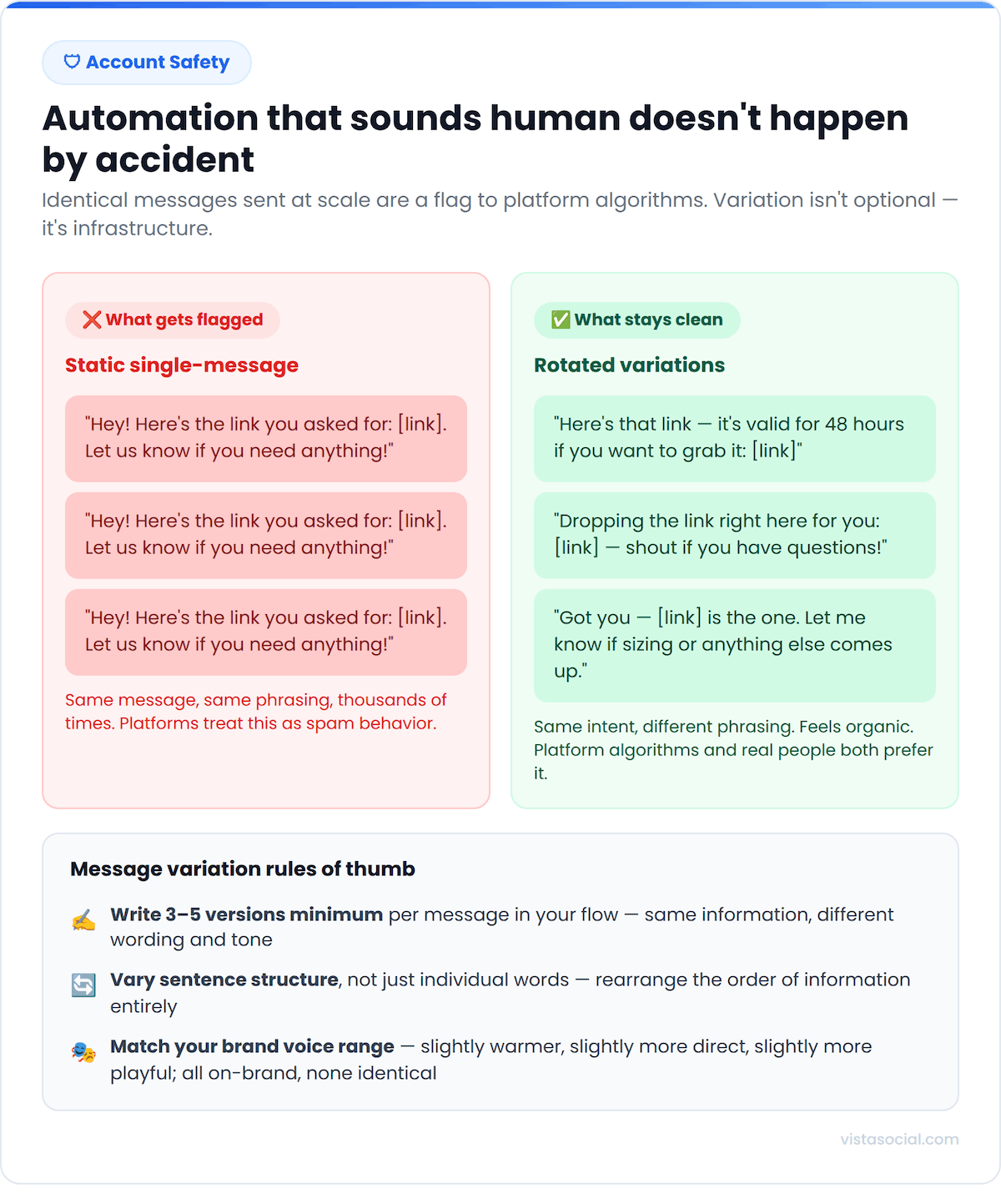
Providing variations (or even using AI to respond) keeps you from sending the same “Hey! Here’s the link you asked for: [link]. Let us know if you need anything!” message again and again, and instead making the response seem more unique and conversational (even if it’s automated).
Action chaining
A single trigger can simultaneously send a DM, apply a label to the conversation in your inbox, assign a follow-up task to a team member, and send an email alert. Everything happens in one automated sequence without anyone needing to manually monitor the inbox for it to work.
Step 4: Identify your triggers
When setting up any DM automation, the first thing you need to do is decide on your triggers. And these will be based on where you’re wanting to promote your products.
For example, you might choose to create automations with triggers like:
- Story reply for when you share new product information in your story
- Comment on reel for when you post a product launch reel
- Direct message for when someone DMs you asking for product information
You can choose to set up keyword-based triggers, like “Comment SHOES to get the discount code” or “DM us GIMME to get the top secret launch page.” And once someone comments or DMs you with your trigger word, the automation will fire.
This helps you generate sales by showing up right when someone is in the mood to buy. They comment or DM, your automation fires with a link or promo code, and boom, they make a purchase.
Another option is to use Vista Social’s AI intent detection to detect when someone asks a certain product-related question so your AI assistant can immediately respond with an accurate answer on sizing questions, pricing, and so much more.
Step 5: Build your auto-response flow
Now it’s time to build out your new sales-generating social media automation. This is so easy in Vista Social:
- Choose your platform
- Input your trigger
- Assign an action
And voila! You’re now automatically sending product or sales pages to interested customers across your social media channels, building out a literal revenue stream right inside your inbox.
Here’s a quick step-by-step guide to get you started.
First, head over to Automations in the Vista Social dashboard.
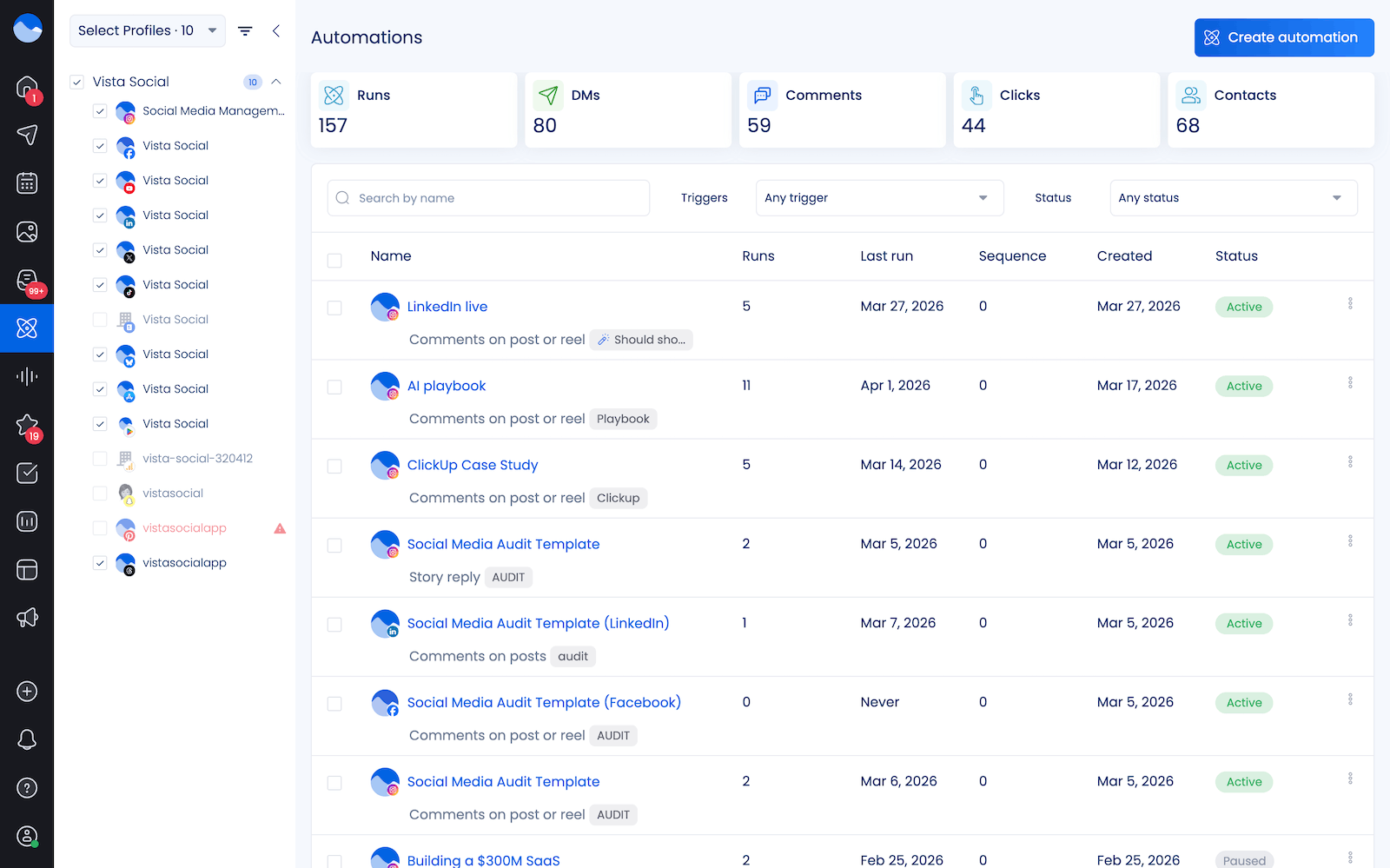
Click Create automation to get started, then select the Create from scratch option. Choose the social media platform you want to create your automation on. Instagram offers the most flexibility with this feature, but you can make this work for nearly any platform of your choice.
Give your automation a name (below, we chose Product launch) then choose your trigger event (Comments on post or reel for our example). We also added keyword trigger LAUNCH that will set this automation off whenever someone comments it on the launch announcement reel.
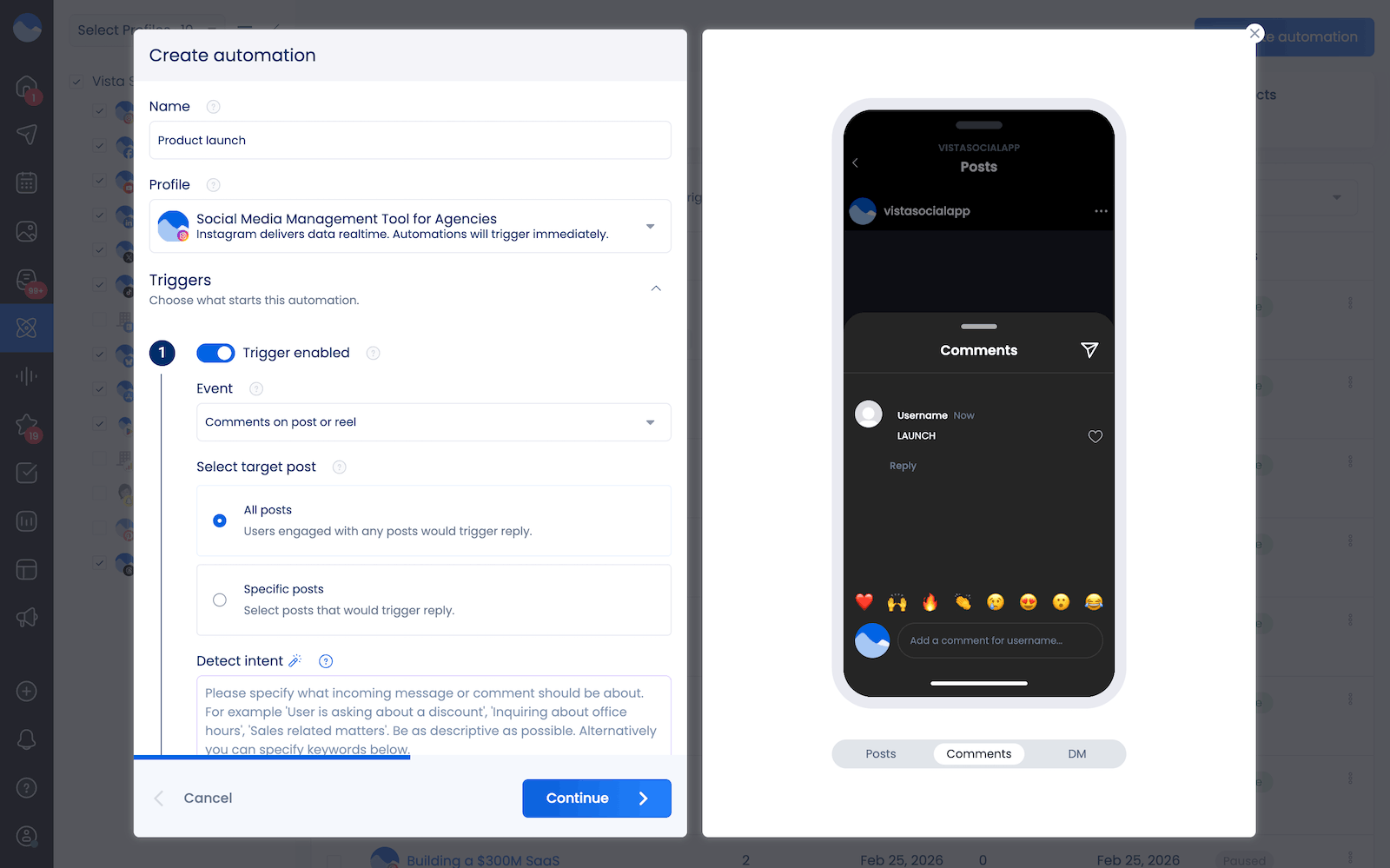
Finally, set up your action. For our example, we’re responding with a DM sharing the link to the launch page where interested customers can purchase a new product.
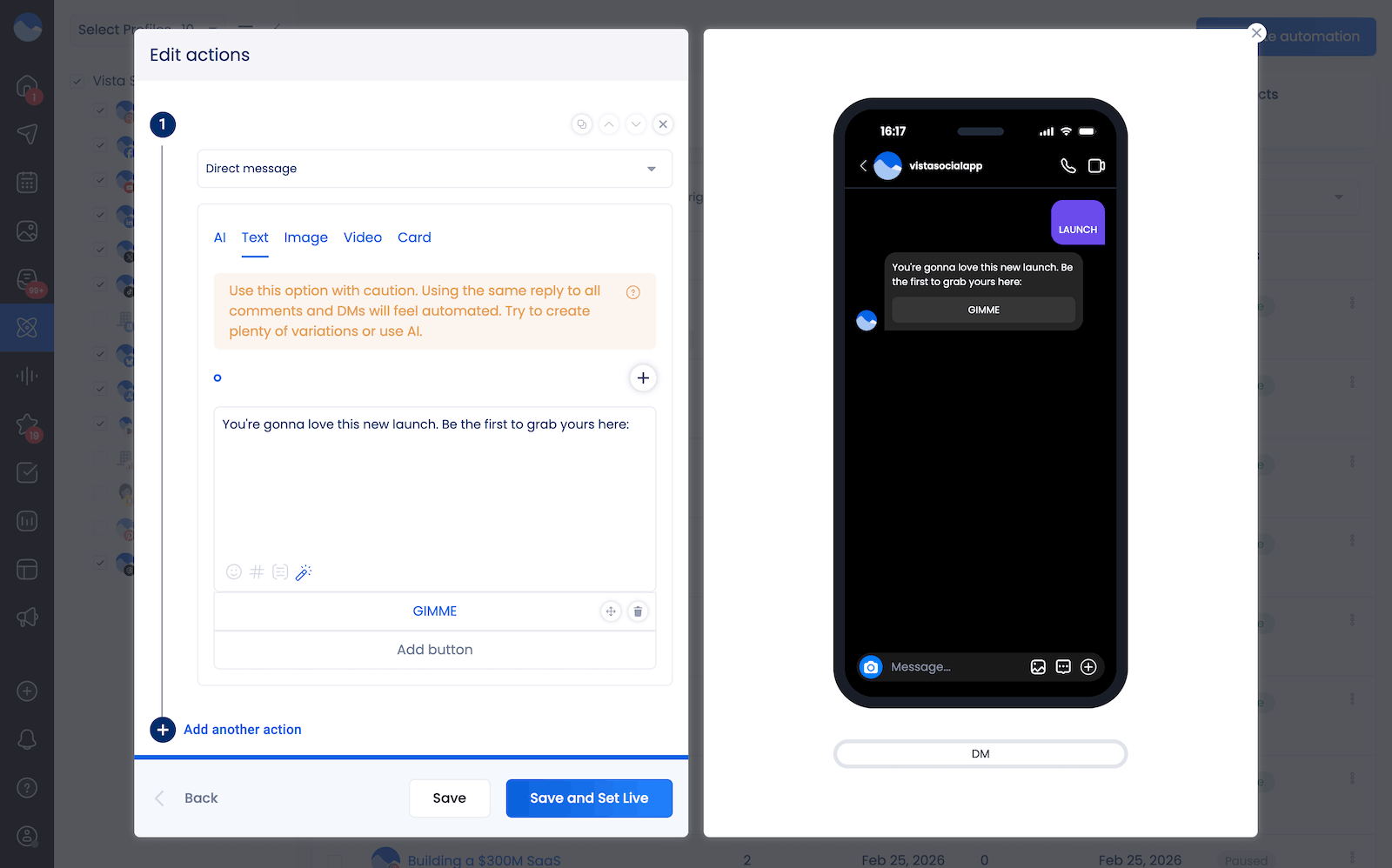
Click Save and Set Live once you’ve configured everything, then test it yourself to make sure everything works properly.
Step 6: Drive traffic into your DMs
A well-built flow does nothing if nobody enters it. The content you post and the ads you run are what push people toward the conversations you’ve set up, so every piece of content needs an intentional CTA pointing toward the inbox.
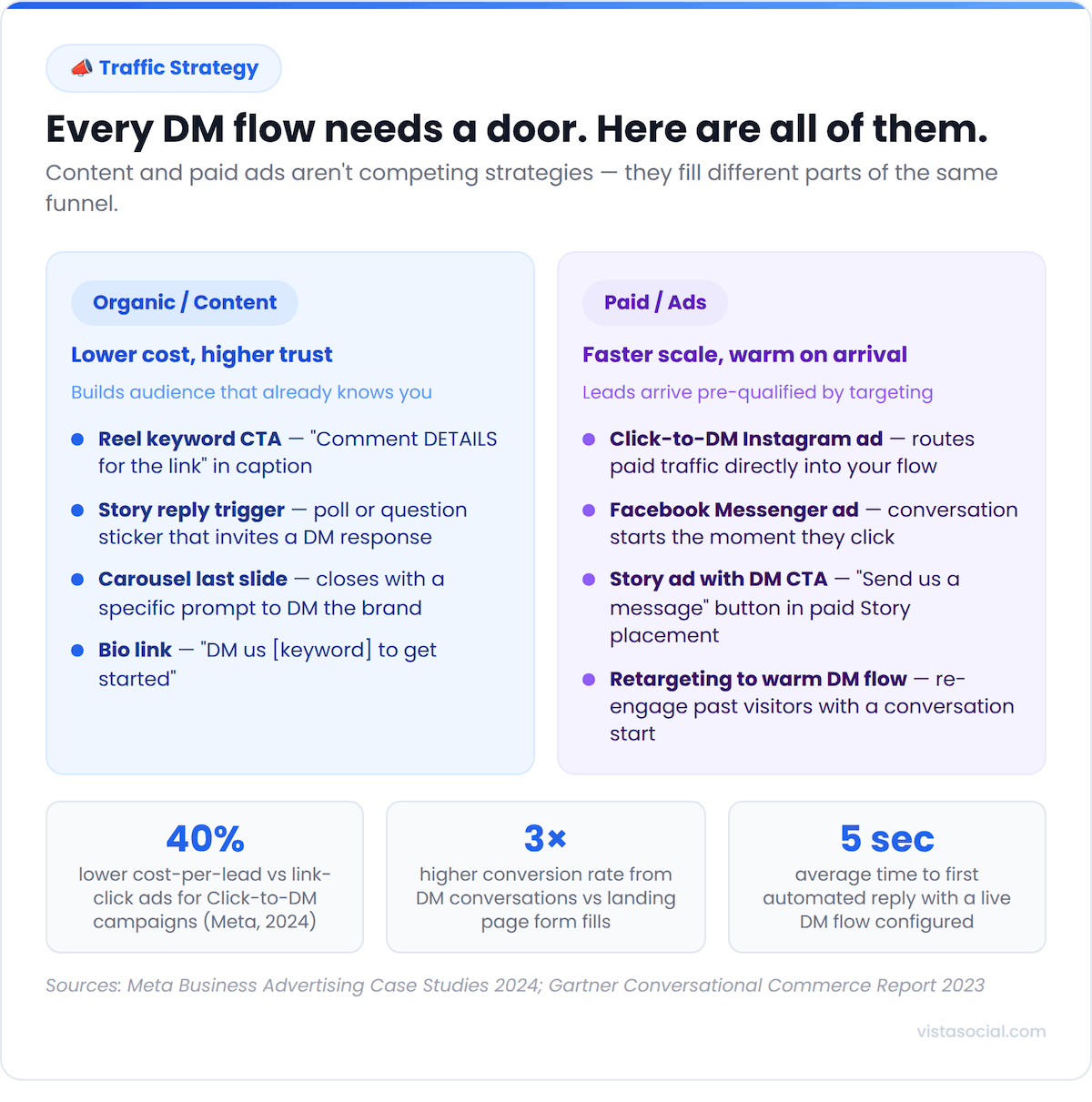
Content-driven entry points are the most scalable. Post a Reel with a keyword CTA in the caption (“Comment DETAILS and we’ll send you the link”), close a carousel with a slide that prompts a direct message, or add a link sticker to your Story pointing people toward a specific DM flow. Because Vista Social’s content calendar and DM automations live in the same dashboard, you can plan the post and configure the matching automation in the same session without switching tools.
Paid entry points layer on top of organic. Click-to-DM ads on Instagram and Facebook route paid traffic directly into a pre-built flow, which means the lead arrives warm and gets an immediate, automated response.
The result is a tighter funnel than most ad campaigns because the conversation starts the moment someone engages rather than sending them to a landing page to fill out a form. All of those conversations from paid and organic entry points land in Vista Social’s unified inbox, so your team has one view of every lead regardless of how they came in.
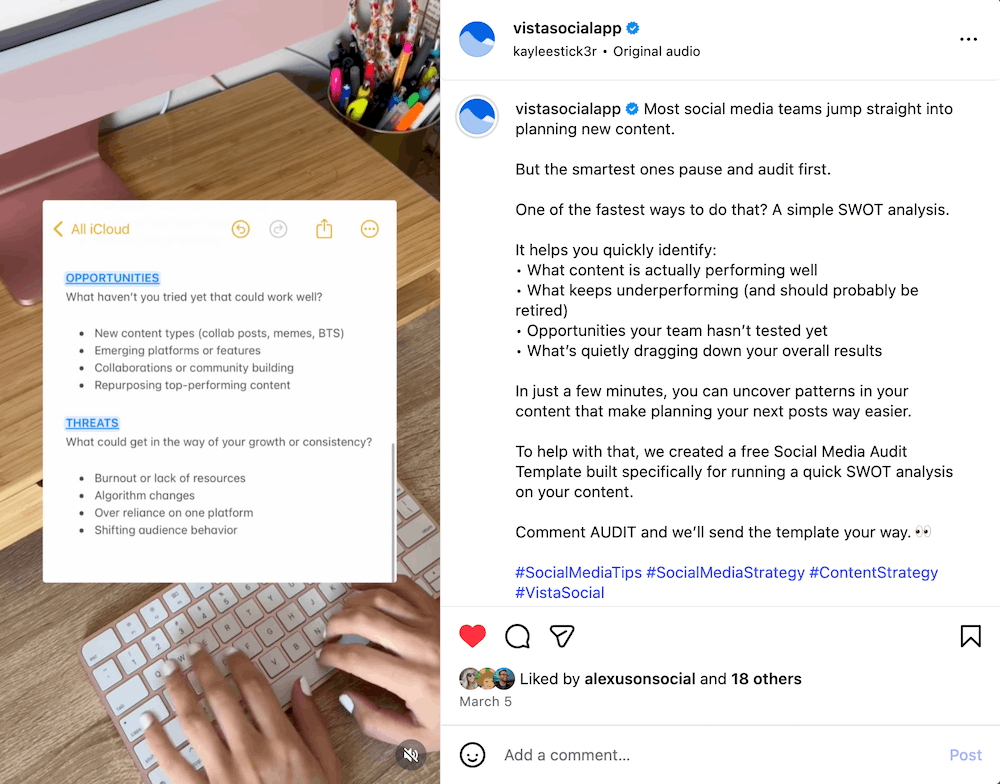
Here’s an example of what a post with a comment-to-DM trigger can look like:
Our DM automation strategies guide covers how to combine content-led and paid entry into a full acquisition strategy.
Step 7: Test, track, and optimize
The first version of any flow is a draft. Running it for two weeks and looking at the data is what turns it into something that performs.
Track open rates, response rates, and conversion rates at each step of the sequence. If people are dropping after message two, that message needs rewriting. If your open rate is strong but your conversion rate is low, the issue is the CTA or the offer, not the trigger or the flow structure.
Vista Social’s DM automation metrics show how many people are activating each automation so you can find the best-performing ones. Build a weekly review into your workflow. And update flows any time your pricing, products, or offers change, because outdated information in an automated response does more damage than no automation at all.
Best practices for maximizing sales with DM automation
Even a well-built flow underperforms when the fundamentals aren’t in place. These are the practices that separate brands consistently driving revenue through DMs from the ones that set up automation once and wonder why it isn’t converting.
Train your AI before you go live
Vista Social’s AI Training and Knowledge Base is only as useful as what you put into it. Upload your FAQs, product details, pricing, shipping policies, and tone guidelines before any flow goes live. Generic automated responses that don’t reference your actual products or brand voice signal to buyers that they’re talking to a bot, and that kills conversion fast.
Keep a human exit in every flow
According to Salesforce’s State of the Connected Customer (Sixth Edition), 61% of consumers prefer self-service for simple matters, but complex or high-value interactions still benefit from a real person. Vista Social’s Assign task action routes any conversation to a specific team member automatically based on intent or keyword, so there’s always a path from automated to human without the user needing to ask for it.
Vary your response text
Sending the same message to thousands of people in a short window is how accounts get flagged. Vista Social’s Dynamic AI Reply and message rotation features handle this automatically, but you have to use them. Write multiple versions of every message in your flow and let the system rotate through them.
Gate your best offers behind a follow
Vista Social’s follower-gate feature prompts commenters to follow the account before receiving the resource or offer they commented for. It’s one of the most efficient follower growth mechanics available and works particularly well for product launches and lead magnets where the audience is already warm.
Audit your flows quarterly
Products change, offers expire, and pricing updates. Set a recurring reminder to review every active flow and verify that nothing is sending outdated information or linking to a dead page. One wrong automated reply can undercut weeks of relationship-building with a lead.
Our DM automation compliance guide covers what’s permitted on each platform. The short version: all triggers need to be user-initiated, and your tool needs to run through the platform’s official API. Vista Social is an officially approved Meta and TikTok application, so every automation runs through the right infrastructure.
Examples of brands using DM automation well
Seeing the mechanics in action makes the strategy click. Here are three businesses running DM automation flows that drive measurable results, each one illustrating a different part of the playbook.
Mindvalley
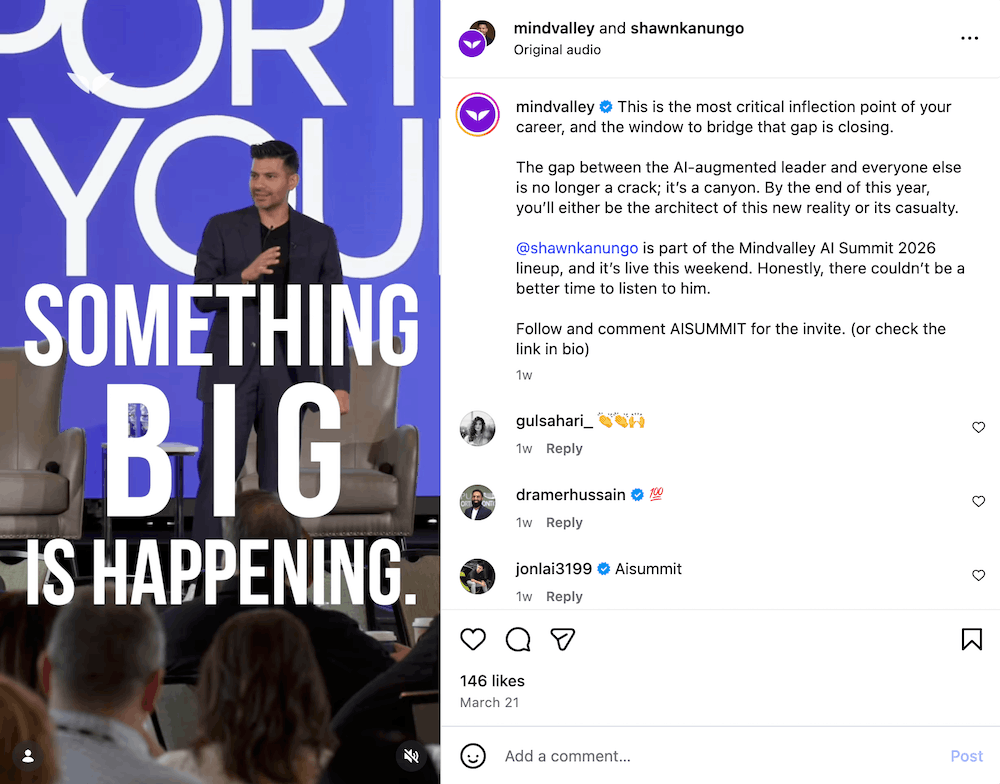
The global personal growth platform uses comment-triggered DM automation to drive registrations for their live events and masterclasses directly from organic content. A recent Reel promoting their AI Summit includes the caption: “Follow and comment AISUMMIT for the invite.”
Anyone who drops that keyword in the comments gets an automated DM with their event registration link. Mindvalley runs this mechanic consistently across their content, turning every relevant post into a self-contained sign-up funnel without sending anyone to a bio link or a landing page.
Coursera
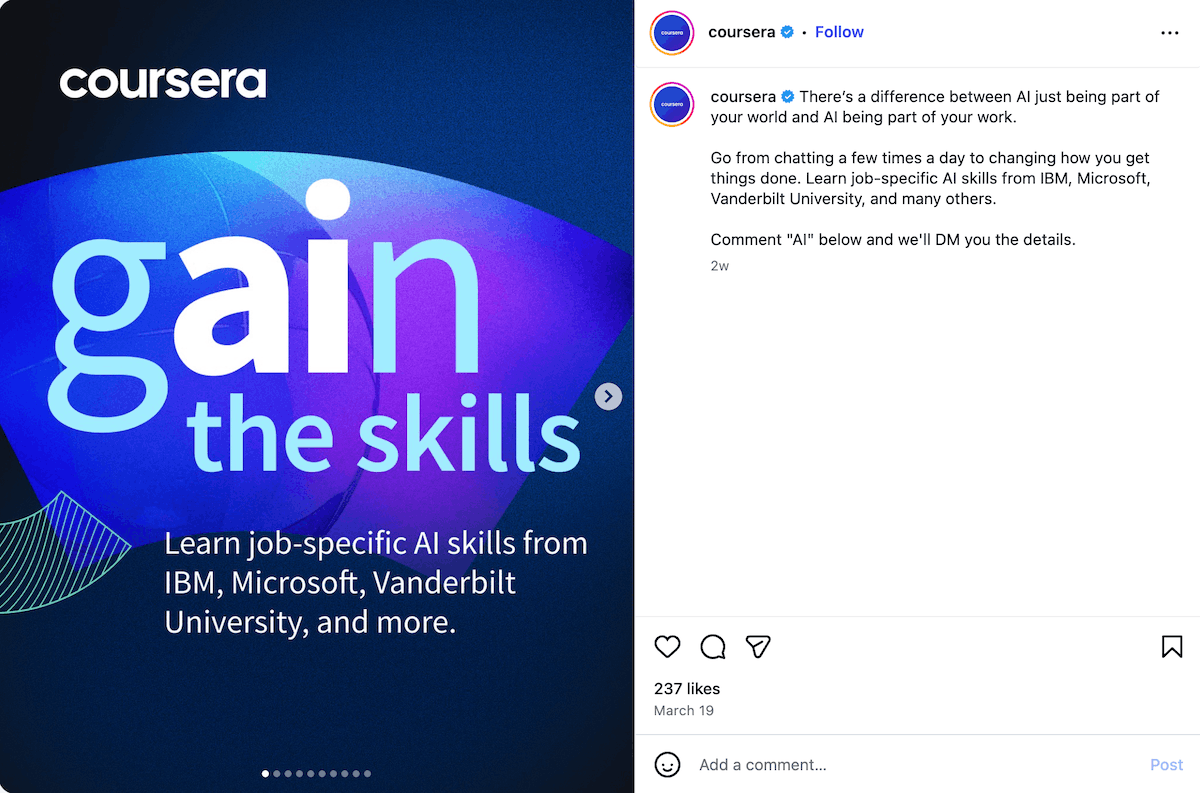
One of the world’s largest online learning platforms uses the same mechanic to drive enrollment into specific programs. A recent carousel promoting job-specific AI skills from IBM, Microsoft, and Vanderbilt University closes with: ‘Comment “AI” below and we’ll DM you the details.’
Sixteen people commented within five days of the post going live, each receiving an automated DM with course information. For a platform whose growth depends on matching the right learner to the right course at the right moment, the comment-to-DM flow turns a single organic post into a direct enrollment channel.
Seventh House Academy
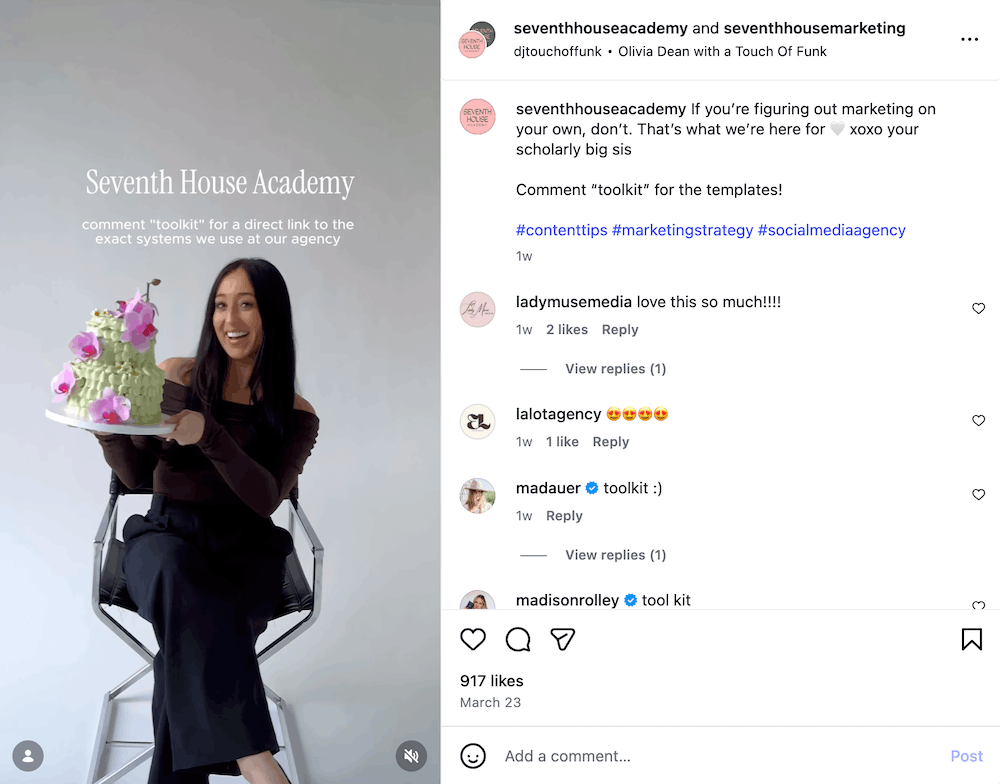
A marketing education brand producing strategy content for business owners and agency teams uses comment automation for lead magnet delivery. A recent Reel about content engagement closes with: ‘Comment “toolkit” for the templates!’
The post pulled 125 comments and 740 likes within 24 hours, with visible commenters already triggering the flow in the thread. For a brand that teaches other marketers how to grow on social, using the exact tactic in their own content is powerful and relevant to those they teach.
Start making sales with DM automation
The six tactics in this guide aren’t separate strategies, but rather layers of the same system. A social media manager who has all of them running is far ahead of one who isn’t.
Each automation handles its piece without requiring constant monitoring or manual input, which frees your team to focus on the conversations that actually need a person in them.
You’ve already built the audience and the content engine. The last piece is connecting both to revenue through a conversation layer that runs whether or not your team is available.
The brands getting consistent revenue from social aren’t doing anything dramatically different at the content level. They’ve just built the infrastructure behind it. Start your first automation here and build that infrastructure for yourself.
Frequently asked questions
What is DM automation?
DM automation uses rules-based and AI-powered logic to send pre-built messages to users when they take a specific action, like commenting a keyword, replying to a Story, or sending a direct message. Platforms like Instagram and Facebook support it through their official APIs. Read our full DM automation guide for a complete overview.
Is DM automation allowed on Instagram?
Yes, as long as you use a tool that connects through Instagram’s official API and your triggers are user-initiated. Automated responses to voluntary user actions are fully within platform guidelines. Read our DM automation compliance guide for platform-specific details.
How do I collect email addresses through Instagram DMs?
Build a flow that asks the user to type their email address in reply to your first automated message, then use Vista Social’s data collection action to capture that response. Our DM automation lead generation guide walks through the setup, including how to connect it to your email platform.
What’s the difference between keyword match and AI intent detection?
Keyword match fires when someone uses an exact word you’ve pre-defined. AI intent detection reads the meaning behind a message and fires the automation based on what the person is asking, regardless of exact phrasing. AI intent scales better for high-volume accounts managing diverse conversation types.
Which platforms does Vista Social support for DM automation?
Vista Social supports DM automation across Instagram, Facebook, and TikTok from a single dashboard, with all conversations feeding into a unified inbox. Our full platform guide covers what’s available on each network.