If you run social for a roster of clients, you already know where the week goes. It goes to repetitive work that doesn’t need much thought. You cross-post the same content five ways, reformat for each network, and rebuild reports by hand. You chase approvals across a dozen inboxes and dig leads out of DMs. None of it is the work that grows the accounts.
This is where automation helps, and also where a lot of agencies get it wrong. The goal isn’t to automate your clients’ presence and walk away. It’s to clear the repetitive work so your team can spend its hours on strategy, creative, and the approvals that need a person. So what can you actually hand off, and what should you keep?
This guide answers that for an agency running social at scale. We’ll cover what social media automation is, plus what’s worth automating and what you should never touch. Then comes a process you can start this week, and how to connect your stack so the busywork runs itself.
What is social media automation?
Social media automation is the use of software to run repetitive social tasks for you, so you’re not touching each one by hand. That spans scheduling and publishing, sourcing content, tracking mentions, building reports, routing approvals, and capturing leads. Anything that repeats and doesn’t need your judgment is fair game for it.
It tends to fall into a handful of categories, each one mapped to a chunk of work that’s probably eating your week right now:
- Publishing and scheduling: Queue posts per client and let them go out at set times
- Content curation and sourcing: Pull fresh content from RSS feeds and other sources to keep each queue full
- Listening and monitoring: Track brand mentions, competitors, and keywords without checking by hand
- Reporting: Generate and send branded client reports on a schedule
- Approval routing: Move posts through client and stakeholder sign-off without manual handoffs
- Lead capture and routing: Catch leads from DMs and comments and push them to your CRM
- Cross-app workflows: Connect your social tool to the rest of your stack through integrations
One distinction matters more than the rest. Automation removes the repetitive steps, the copy-pasting and the manual scheduling that a machine handles perfectly well. Autopilot removes the human, handing a client’s voice and relationships to software and hoping it holds up. That’s how an agency that scales by automating ends up losing the accounts it scaled on. Any decent social media planning guide starts from that line rather than from a feature list.
Why social media automation matters in 2026
The platforms keep growing, and your workload grows with them. There are now 5.79 billion social media user identities worldwide, close to 70% of the planet, spread across nearly seven platforms each. Run that against a roster of 20 to 50 clients and the math turns. You get more networks, more content, and more sign-offs than any team handles by hand for long.
The first reason is output. A team of five on 40 clients can’t post at the cadence the platforms reward if a person touches every post. The gap between what you should publish and what you have time to publish keeps widening as the roster grows. Automation closes that gap, letting a small team stay consistent across every account without working late to do it. You get the output of a much bigger team from the people you already have.
Second is the cost of repetitive work. Hours go to reformatting one post into five, rebuilding a report you’ve made dozens of times, and chasing sign-offs across inboxes. McKinsey’s research on AI adoption found that the biggest gains come not from buying tools but from redesigning the workflows underneath them. Fix the workflow and that time comes back as billable work.
And the third reason is consistency, which is what compounds on social. Automated scheduling and sourcing keep every client’s cadence steady. That holds through a launch week, a sick day, or any other disruption. When you automate the repeatable parts and keep a person on the judgment calls, you can add clients without the workload becoming unmanageable.
What you should (and shouldn’t) automate
Most automation guides skip this part, which is exactly why their advice gets people into trouble. Not everything belongs on autopilot. The line between what does and what doesn’t is the difference between automation that earns its keep and automation that costs you a client.
The safe side is anything repeatable and low-risk. You can hand these off without losing sleep:
- Scheduling and publishing across every client’s networks
- Posting at each audience’s optimal times
- Content sourcing and curation from trusted feeds
- Brand, competitor, and keyword monitoring with alerts
- Recurring client reports and internal reviews
- Approval routing to clients and stakeholders
- Lead capture and routing into your CRM
The other side is anything that carries real risk or needs a human read. Keep an operator on these:
- Community replies that need nuance, warmth, or a personal touch
- Crisis response and anything touching a sensitive topic
- Creative and strategic calls about what a client posts and why
- Anything that defines or protects a client’s brand voice
The test is simple enough to apply on the fly. If a task repeats and carries low stakes, automate it, and if it needs empathy, judgment, or brand instinct, keep a person on it. Auto-replying to someone asking your hours is fine. Auto-replying to a furious customer on a client’s flagship account is how you lose the account.
How to automate your social media tasks (step by step)
You don’t flip everything on at once. You build it up in a sensible order, fixing each workflow before you speed it up. Automating a broken process only gets you to the wrong place faster. Here’s the order that works.
Audit your repetitive tasks
Spend a few days noticing where your week actually goes, nothing formal, just a running list of what you do over and over across clients. By Friday the pattern tends to be obvious. It’s almost always the same three at the top: scheduling, client reports, and the endless approval chasing. The one rule before you automate any of it is to understand it first. A workflow you haven’t thought through is just a faster version of a broken process.
Automate publishing
Publishing is the place to begin, since it’s the easiest task to hand off and the quickest to pay you back. Queue your posts ahead, set recurring slots for each client, and let them go out without you in the room. The one place value tends to leak is timing, so schedule into each audience’s optimal posting times rather than eyeballing it per account.
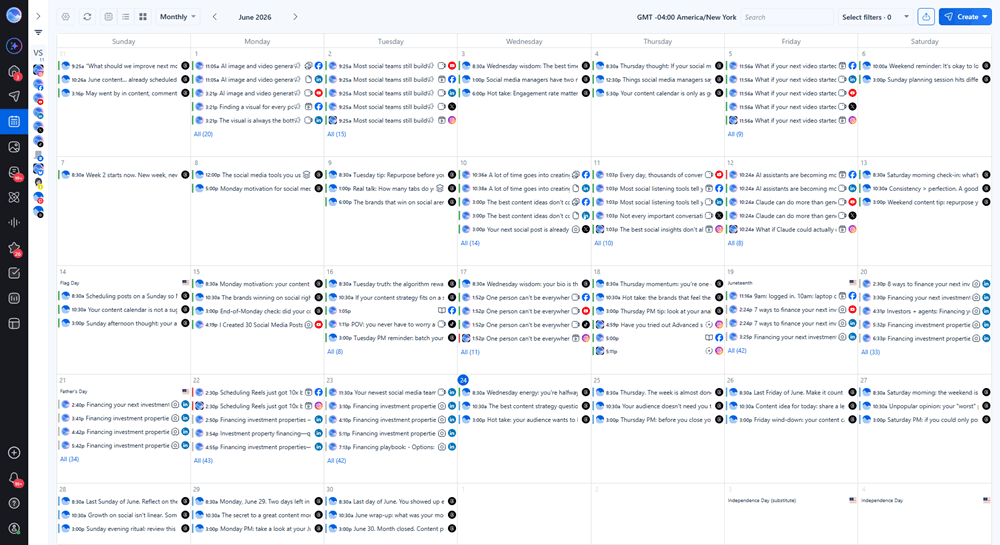
The mistake here is leaving the queue completely alone once it’s running. It still wants a glance now and then. That’s true especially when a client is mid-launch, or when the news takes a turn that makes last week’s scheduled post look badly timed.
Automate curation and sourcing
A full roster drains a queue fast, and an empty queue is where consistency starts to slip. The fix is sourcing that feeds itself, pulling from each client’s RSS feeds, their blog, and whatever channels you trust.
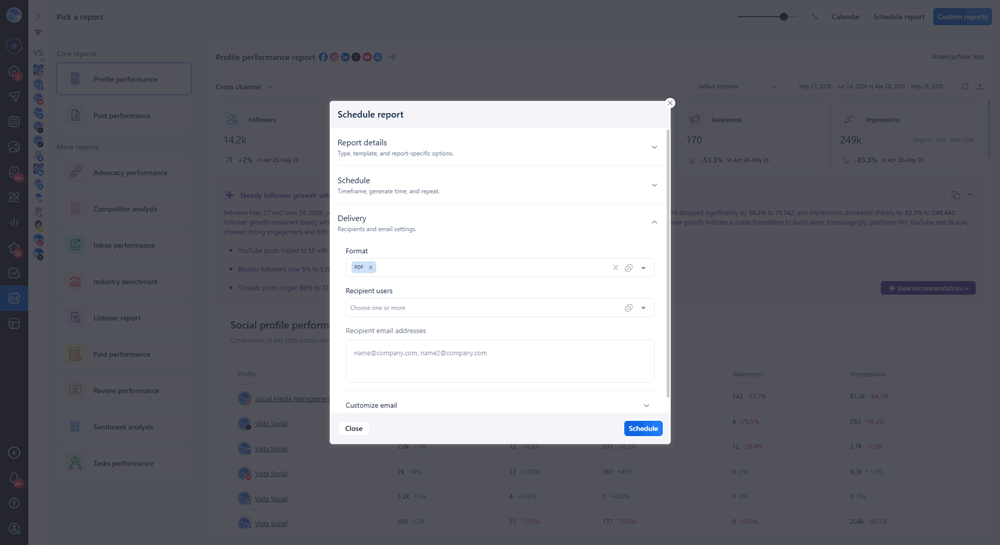
Vista Social’s Smart Publisher does this well. It turns a client’s new blog post into a social update that’s ready from blog to social before you’ve opened the tab. You’ll still want eyes on it, though. Auto-sourced content often reads slightly off for the client it’s headed to. Catching that is the kind of thing a person does and a feed doesn’t.
Automate listening and alerts
Nobody can hand-watch every mention across dozens of clients, so the sensible move is to stop trying. Point social listening at each brand, its rivals, and the keywords that matter. Then send the alerts to whoever owns that account. The benefit runs in both directions, since a problem reaches you before it spreads and a buying signal doesn’t sit unnoticed for days. Aim the same setup at competitors too. The right competitor analysis tools flag a real move, instead of leaving someone to refresh a rival’s profile all afternoon.
Automate reporting
Reporting is the task agencies dread most, and it’s also the easiest one to give away. Set up scheduled, branded reports that pull each client’s numbers and land on a fixed day, and you’ll never rebuild that deck on a Friday again.
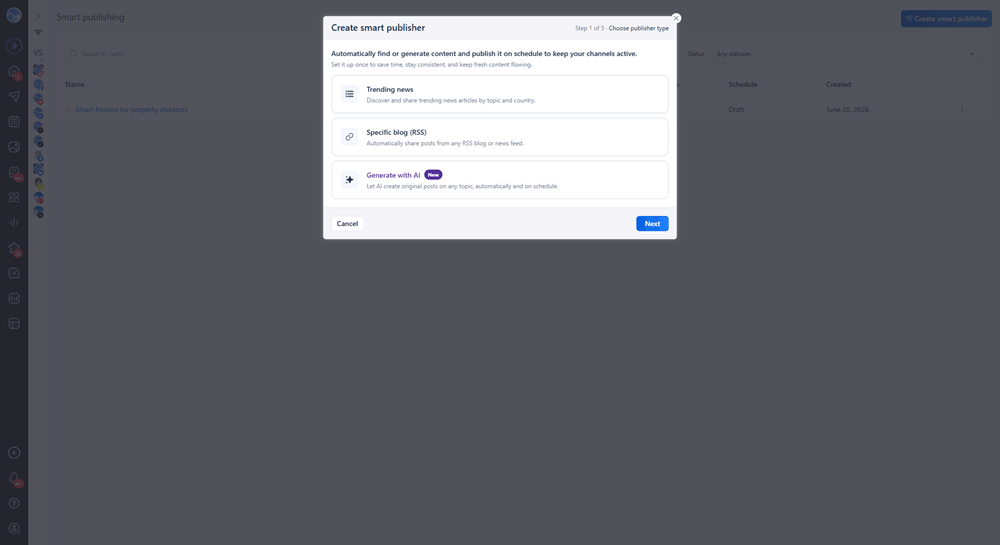
Hook the data into clear social media analytics. The report then shows the client what moved and why. The one thing automation won’t do is make the report worth reading. Keep a short human note on top that ties the numbers back to what the client cares about.
Automate approval routing
Approvals are usually the single biggest drain on an agency’s week, so this is the step worth getting right. Route posts through client and stakeholder sign-off automatically, pulling the right people in at the right moment, and most of the chasing disappears. The best setups let external approvers sign off without a login, so you’re not asking 40 clients to learn your tool just to click approve. You can route the post automatically and still leave the actual yes-or-no to the person who owns it.
Automate lead capture and routing
Leads hide in DMs and comments, and they go cold faster than you’d expect. Set up automation to catch the messages that qualify. It pushes them into your CRM the moment they land. An AI reply can hold the first response too, so a prospect on a client’s account isn’t left waiting while your team is buried elsewhere. What you don’t want is to hand the whole conversation over. Capture and route the lead, then put a person on the part that turns a DM into a deal.
Connect the rest of your stack
This is the step that ties the others together. Your social tool shouldn’t sit cut off from your CRM, your project boards, and the docs where content actually gets written. Connect them and automation stops being a pile of separate tricks and starts running your operation as one thing. That connective layer is large enough to deserve its own section.
Automate beyond your social tool: Vista Social + Zapier, Make, and N8N
This is where automation stops being a social-tool feature and starts reaching into your whole operation. Vista Social connects out through Zapier, Make, and N8N, so it can talk to nearly everything else your agency runs on. That reach is what turns a publishing tool into the hub the rest of your stack plugs into.
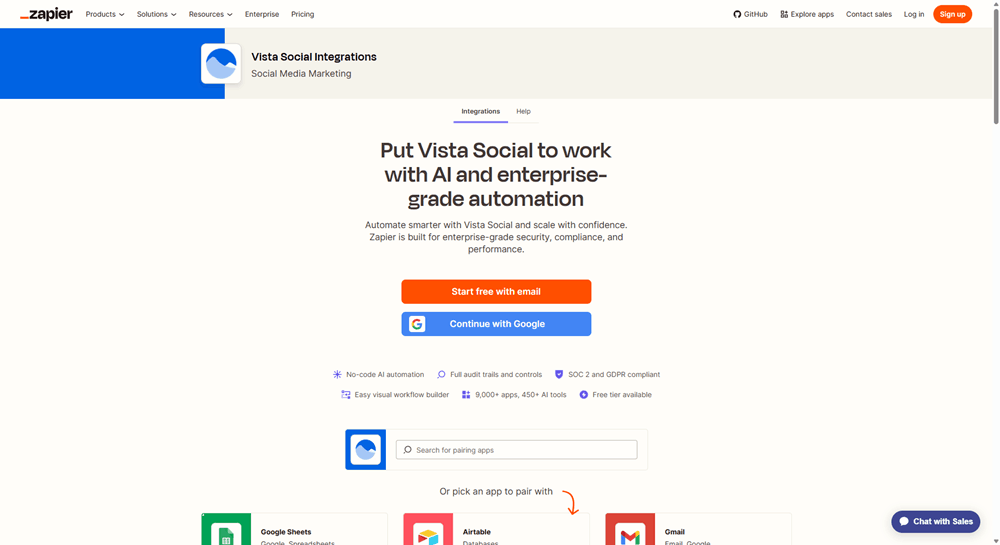
Zapier’s integration alone connects Vista Social to more than 9,000 apps. That covers most of what an agency touches, from CRMs to spreadsheets to project boards. You set a trigger in one app and an action in another. The two keep each other in sync while nobody copies a thing across by hand.
The everyday workflows are where this pays off, and a few you can build right now include:
- Draft posts in Notion and schedule them straight to Vista Social
- Turn rows in a Google Sheet into scheduled posts for bulk client planning
- Push a client’s new blog post from an RSS feed into their social queue
- Build and schedule carousel posts through an automated flow
Make, N8N, and the MCP server for advanced automation
When the flows get more involved, Make and N8N pick up where Zapier stops. Make is built for multi-step logic with branches, and N8N is open-source, so an agency that wants to host its own automation can. Both come included on the Advanced, Scale, and Enterprise plans, the same as Zapier.
The MCP server is the newest piece, and the one that points where this is all heading. It lets an AI assistant work inside your account directly. Your team can schedule posts, pull client reports, and triage an inbox just by asking. You connect it through the Vista Social MCP server and run real tasks by describing what you want done.
On cost, the answer is simpler than most people expect. You don’t need the API add-on for Zapier, Make, or N8N unless you’re making custom API calls. The standard actions like scheduling posts and creating notes are already in your plan. A few premium endpoints sit behind a separate add-on, like creating profile groups or pulling detailed metrics. Check your plan if those are what you need.
All of this points you to the support docs on purpose, since they walk each setup through step by step. What matters for an agency is the bigger pattern. Vista Social holds your native social automation and reaches out to the rest of your stack. You’re not stitching six separate tools together and hoping they stay connected.
Social media automation tools to consider
No single tool does everything well, so it helps to think in three layers, and most agency stacks use all of them. The first is the native automation inside your social platform: publishing, listening, reporting, approvals, and lead capture. A platform like Vista Social keeps all of that in one place, which saves your team the constant tab-switching that wastes an hour a day.
The second layer is the integration tools, Zapier, Make, and N8N, which link your social tool to everything else so data moves on its own. This is what makes a stack work as one system instead of many separate logins. The third is the AI layer, the assistants that draft captions and handle routine replies, though an operator still signs off on anything a client will see. Used with some judgment, they’re a real help with AI in social media marketing, especially at agency volume.
Vista Social lives in that first layer and reaches into the second. It doesn’t pretend to run a client’s whole presence while you sleep. What it does is hold your native social automation in one place, with AI built into the core rather than bolted on. From there, it connects out to the rest of your stack. That’s one place to work from instead of six.
Common social media automation mistakes
Most automation problems come down to one root mistake, which is handing a machine something that needed a person. It shows up first in engagement. Saved replies handle the simple “what are your hours” questions fine. But a real conversation on a client’s account needs a real operator, so automate the routing and leave the relationship alone. Push the same instinct too far and the brand starts sounding machine-made. Once audiences notice that, trust drops fast. The fix is the same in both cases. Keep a human voice on anything that defines the brand, and let automation handle the mechanics underneath.
The other failures come from neglect rather than overreach. Setting a queue and forgetting it is the classic version. Content keeps publishing on a day a client would rather pause posting, so scan the schedule whenever the news shifts. Just as common is never checking whether the automated work performs, which only means you’re producing noise more efficiently. Watch the numbers per client and adjust around what’s actually working. Underneath all of these sits the worst one, which is automating a broken process. Speeding up a mess only spreads it across more clients. Fix the process first, then automate the version that works.
How to measure whether your automation is working
Automation only earns its spot if it delivers, so judge it on outcomes rather than on how many tasks it ticks off. The most direct read is hours reclaimed, so track what your team gets back each week and where that time goes. Say a client report that used to eat a full day now takes an hour. That’s a number you can put in front of the client at the next review.
Cadence is the next thing to watch, and the question is whether you’re holding a steady schedule across every account even in a launch-heavy week. Consistency is what compounds on social, so a calendar that stays full across the whole roster is a good sign the automation is doing its job. Lead flow deserves the same scrutiny, so confirm that the leads you’re capturing actually reach the CRM and get a follow-up before they cool off.
The last measure is whether the automated content still pulls its weight. Pull engagement, watch time, and conversions, and hold them against your hand-built posts. Automation that underperforms on a particular client is a cue to adjust rather than to automate harder. Tie all of it back to clear social media goals so you’re measuring against what each client wants, not just counting activity for its own sake.
Make social media automation work for your agency
Done well, automation gives a small agency the output of a much bigger one without losing the quality that keeps clients. The goal was never to automate a client’s presence and disappear. It’s to clear the repetitive work so your hours go where they matter, into strategy, creative, and the client relationships that grow the business.
Vista Social pulls that into one place. The native automation covers publishing, listening, reporting, approvals, and lead capture, with AI built into the core. The integrations through Zapier, Make, N8N, and MCP then wire your social work into everything else you run. If clearing the busywork while keeping the craft sounds like the right trade, you can try Vista Social free for 14 days, no card required. See how much of your week comes back.
FAQs
What is social media automation?
It’s using software to handle the repetitive social tasks for you, things like scheduling posts, sourcing content, monitoring mentions, routing approvals, building reports, and capturing leads. The idea is to take the manual steps that don’t need your judgment off your plate, so the team can focus on strategy and craft instead.
What social media tasks can you automate?
Publishing and scheduling, content curation, brand and keyword monitoring, client reporting, approval routing, and lead capture into your CRM are all fair game. You can sync data between your social tool and other apps on top of that. These tasks repeat and carry low risk, which is what makes them safe to hand off.
What should you NOT automate on social media?
Anything that needs empathy or judgment should stay with a person. That covers community replies with real nuance, crisis response, sensitive topics, and the creative or strategic calls. It also covers anything that defines or protects a client’s brand voice.
Is social media automation worth it?
For most agencies, yes. It claws back the hours lost to repetitive work and keeps your cadence steady across every client. What makes it pay off is automating the repeatable parts while keeping operators on the judgment calls.
Can I automate posting to all platforms at once?
Yes. A social media management platform lets you schedule and publish to several networks from one place. You can still tailor each post per platform so it doesn’t read as copy-pasted across a client’s channels.
How do I connect Vista Social to other apps like Zapier?
Zapier, Make, and N8N are available on the Advanced, Scale, and Enterprise plans. You set up a trigger and an action to sync data between Vista Social and over 9,000 other apps. You won’t need the API add-on unless you’re making custom API calls.
Does automation hurt engagement?
It can, if you overdo it. Automated content that ignores the audience or stands in for real conversation will drag engagement down on a client’s account. Kept in proportion, it holds your cadence steady and frees the team to engage where it counts.